[Flutter] copyWith 메소드의 역할
copyWith 의미
copyWith 메소드는 Flutter에서 Immutable 클래스를 복사하면서 특정 속성들을 변경할 수 있도록 해주는 메소드입니다. 주로 StatefulWidget의 상태를 관리할 때 많이 사용됩니다.
copyWith 예제
예를 들어, 다음과 같은 Person 클래스를 생각해봅시다.
class Person {
  final String name;
  final int age;

  Person({required this.name, required this.age});

  Person copyWith({String? name, int? age}) {
    return Person(
      name: name ?? this.name,
      age: age ?? this.age,
    );
  }
}
위의 Person 클래스는 copyWith 메소드를 포함하고 있습니다. 이 메소드는 새로운 Person 객체를 생성하되, 주어진 속성 값이 있으면 그 값으로, 없으면 기존 객체의 값을 사용합니다.
void main() {
  Person person1 = Person(name: "Alice", age: 30);
  Person person2 = person1.copyWith(age: 31);

  print(person1.name); // Alice
  print(person1.age);  // 30

  print(person2.name); // Alice
  print(person2.age);  // 31
}
Person 클래스를 통해 만들어진 person1의 인스턴스를 copyWith메소드를 사용하여 age 만 다른 person2 인스턴스를 만들어줄 수 있습니다.
copyWith 메소드를 사용하면 특정 필드만 변경하면서 나머지 필드는 그대로 유지하는 새로운 객체를 쉽게 만들 수 있습니다. Flutter에서 State를 업데이트할 때 매우 유용합니다. 예를 들어, State 객체가 여러 속성을 가지고 있을 때, 특정 속성만 변경하고 나머지 속성은 그대로 유지한 상태로 업데이트를 할 수 있습니다.
copyWith 메소드는 Dart의 패턴 중 하나로, 클래스의 인스턴스를 복사하면서 일부 속성만 변경하고자 할 때 많이 사용됩니다. 이 패턴은 Immutable 객체를 효율적으로 다루기 위해 널리 사용됩니다.
자주 등장하는 Theme 에서의 copyWith
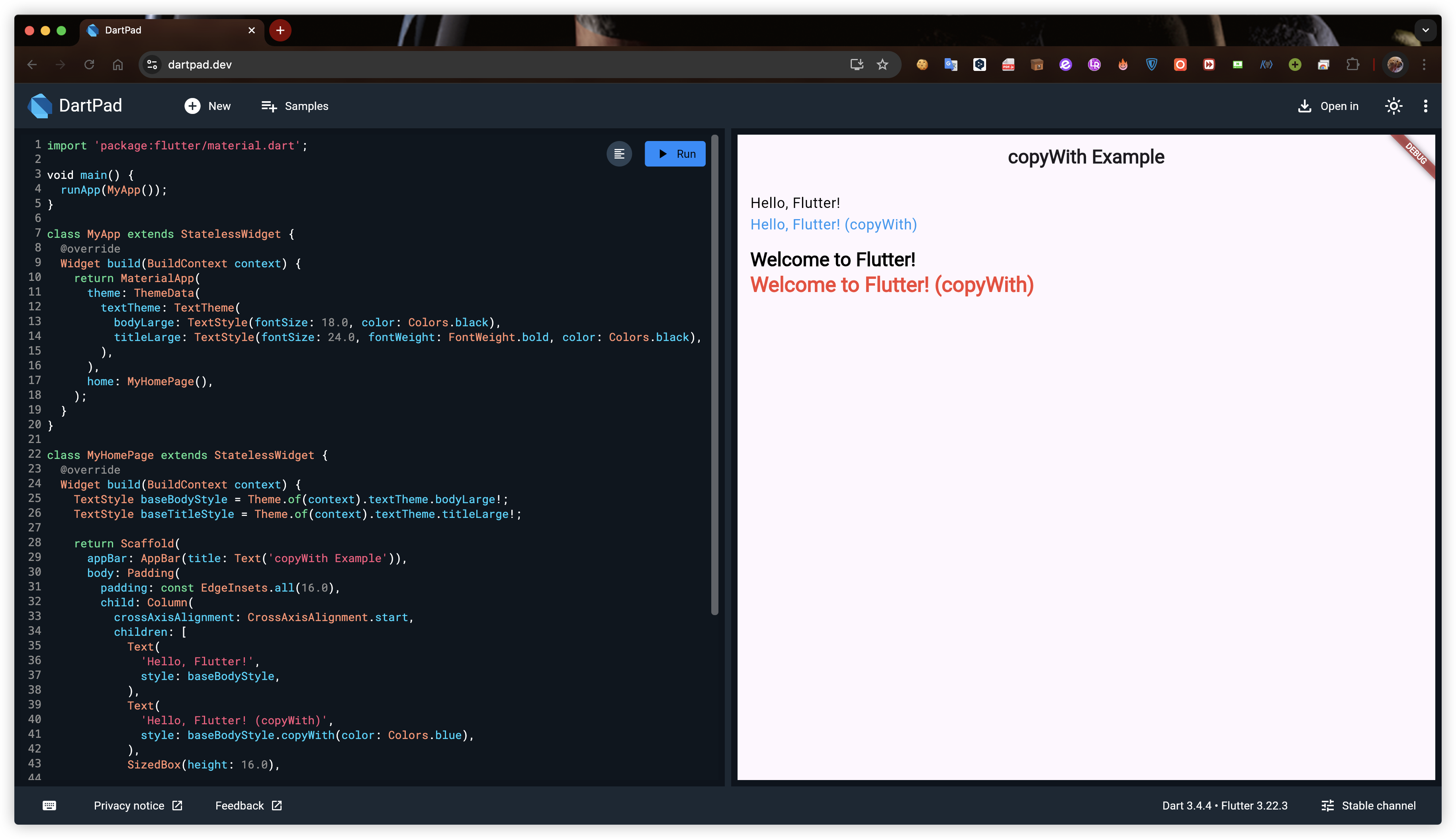
copyWith 를 직접 구현하여 사용할 수도 있지만 Flutter의 Theme, --Style 등의 위젯에서 자주 사용됩니다. 기본 예제를 통해 copyWith가 무엇인지 알았으니 Flutter의 Theme 에서도 다뤄보겠습니다.
// class MyApp extends StatelessWidget
MaterialApp(
      theme: ThemeData(
        textTheme: TextTheme(
          bodyLarge: TextStyle(fontSize: 18.0, color: Colors.black),
          titleLarge: TextStyle(fontSize: 24.0, fontWeight: FontWeight.bold, color: Colors.black),
        ),
        home: MyHomePage(),
    ),
)
ThemeData 를 통하여 textTheme의 테마만 정해보겠습니다.
Flutter 3.0부터 TextTheme 클래스가 Material 3 디자인 사양에 맞춰 업데이트되었습니다. 따라서 스타일에 관한 프로퍼티에 혼동 없으시길 바랍니다.
[cf.] bodyLarge의 Material 2 버전은 bodyText1 이었습니다.
// class MyHomePage extends StatelessWidget
TextStyle baseBodyStyle = Theme.of(context).textTheme.bodyLarge!;
TextStyle baseTitleStyle = Theme.of(context).textTheme.titleLarge!;
테마에 대한 스타일을 인스턴스로 생성하였습니다.
Text(
    'Hello, Flutter! (copyWith)',
    style: baseBodyStyle.copyWith(color: Colors.blue),
),
bodyLarge 테마에 지정한 스타일은 유지하되, color만 blue로 바꿔줍니다.
Text(
    'Welcome to Flutter! (copyWith)',
    style: baseTitleStyle.copyWith(color: Colors.red, fontSize: 26.0),
),titleLarge에 지정한 스타일은 유지하되, color를 red로 바꾸고 fontSize는 26.0으로 변경해줍니다.
전체 CODE
import 'package:flutter/material.dart';

void main() {
  runApp(MyApp());
}

class MyApp extends StatelessWidget {
  @override
  Widget build(BuildContext context) {
    return MaterialApp(
      theme: ThemeData(
        textTheme: TextTheme(
          bodyLarge: TextStyle(fontSize: 18.0, color: Colors.black),
          titleLarge: TextStyle(fontSize: 24.0, fontWeight: FontWeight.bold, color: Colors.black),
        ),
      ),
      home: MyHomePage(),
    );
  }
}

class MyHomePage extends StatelessWidget {
  @override
  Widget build(BuildContext context) {
    TextStyle baseBodyStyle = Theme.of(context).textTheme.bodyLarge!;
    TextStyle baseTitleStyle = Theme.of(context).textTheme.titleLarge!;

    return Scaffold(
      appBar: AppBar(title: Text('copyWith Example')),
      body: Padding(
        padding: const EdgeInsets.all(16.0),
        child: Column(
          crossAxisAlignment: CrossAxisAlignment.start,
          children: [
            Text(
              'Hello, Flutter!',
              style: baseBodyStyle,
            ),
            Text(
              'Hello, Flutter! (copyWith)',
              style: baseBodyStyle.copyWith(color: Colors.blue),
            ),
            SizedBox(height: 16.0),
            Text(
              'Welcome to Flutter!',
              style: baseTitleStyle,
            ),
            Text(
              'Welcome to Flutter! (copyWith)',
              style: baseTitleStyle.copyWith(color: Colors.red, fontSize: 26.0),
            ),
          ],
        ),
      ),
    );
  }
}