| 일 | 월 | 화 | 수 | 목 | 금 | 토 |
|---|---|---|---|---|---|---|
| 1 | 2 | 3 | 4 | 5 | 6 | |
| 7 | 8 | 9 | 10 | 11 | 12 | 13 |
| 14 | 15 | 16 | 17 | 18 | 19 | 20 |
| 21 | 22 | 23 | 24 | 25 | 26 | 27 |
| 28 | 29 | 30 |
- 백준
- BOF
- FastAPI
- fastapi를 사용한 파이썬 웹 개발
- Flutter
- study book
- ARM
- system hacking
- PCA
- BAEKJOON
- Widget
- pytorch
- Kaggle
- DART
- 파이토치 트랜스포머를 활용한 자연어 처리와 컴퓨터비전 심층학습
- BFS
- MDP
- 영상처리
- Stream
- Computer Architecture
- Algorithm
- Got
- ML
- llm을 활용 단어장 앱 개발일지
- C++
- MATLAB
- rao
- Dreamhack
- bloc
- Image Processing
Bull
[Algorithm] KMP 알고리즘 - 문자열 검색 본문
소개
만든 사람의 이름 앞 글자를 따서 Knuth, Morris, Prett로 지었다. 해당 알고리즘은 문자열 A에서 문자열 B가 어디에 있는지 찾는 알고리즘이다. 이는 브루트포스를 통해서 모든 경우를 찾아도 되지만, O(NM) 시간복잡도를 가지기 때문에 해당 알고리즘을 사용하면 O(N+M)으로 단축시킬 수 있다.
KMP 알고리즘 내에서는 LPS (Logest Prefix which is also Suffix) 알고리즘이 사용되는데, 이는 다른 글로 정리 하였다. [1]에 정리하였다. [1] LPS 정리도 [2] 자료를 통해서 정리를 하였는데, 해당 블로그 글을 작성하신 분이 정리를 참 잘해놓으셔서 이해하는데 큰 도움을 얻었다.
원리
[1] LPS를 설명할 때 패턴이 일치되는 부분의 접두사와 접미사를 각 문자 위치에 일치되는 수만큼 리스트로 기록하였다. 이유는 다음에 올 문자열 검색 시 뒷 부분의 패턴이 중복하여 계속 이어질 수 있기 때문에, 그 중복되는 비용만큼 절약하기 위해 pi 리스트에 인덱스를 저장하였다. 그러면 새로 패턴을 검사할 때, 처음부터 돌아가는 것이 아닌, "앞 부분의 일부가 겹치니 해당 인덱스부터 다시 검사하세요" 라는 의미로 사용될 수 있었기 때문이다.
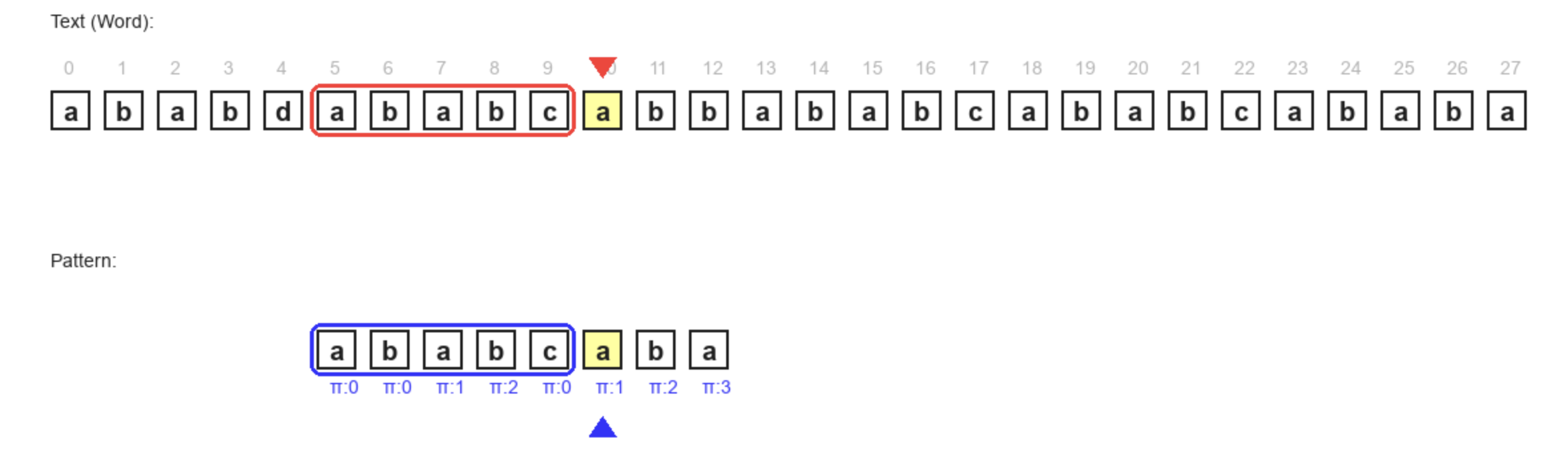
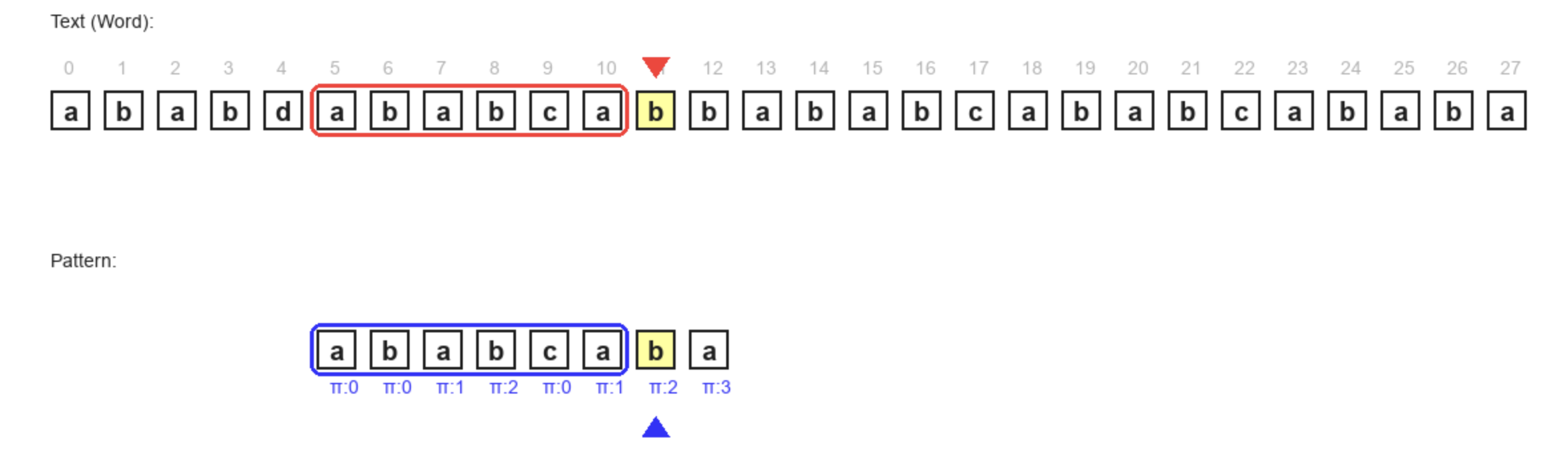
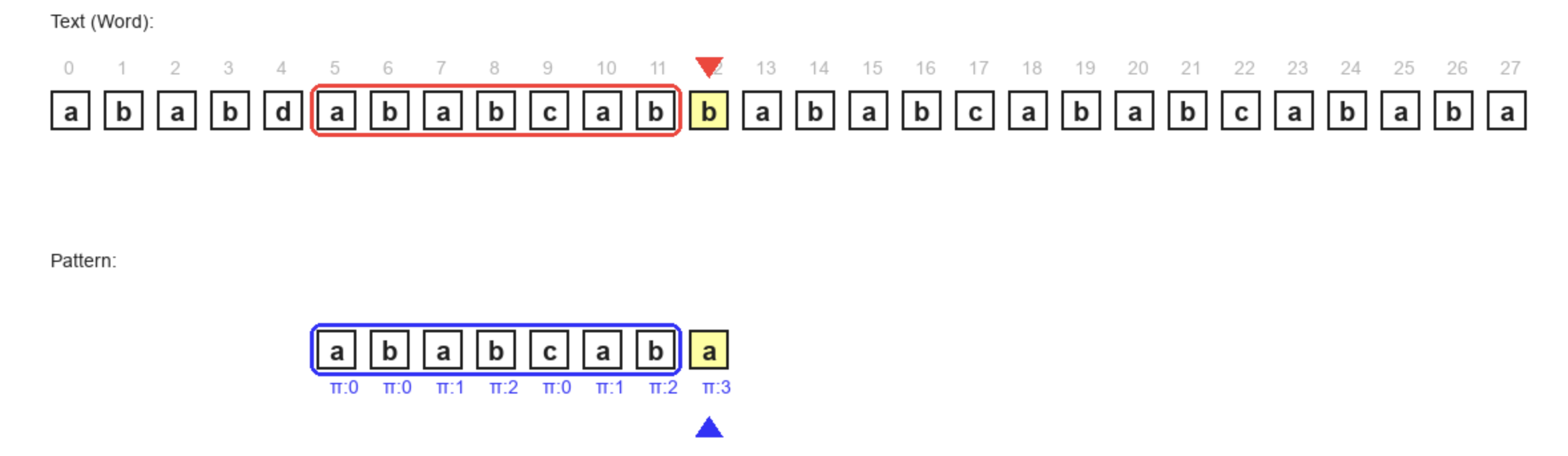
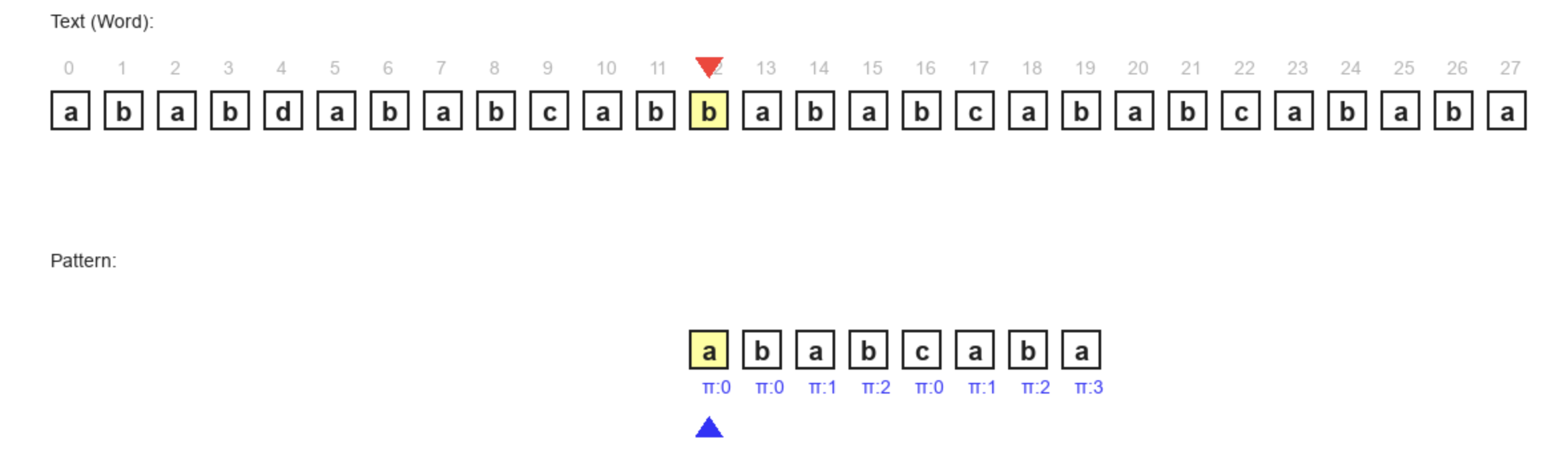
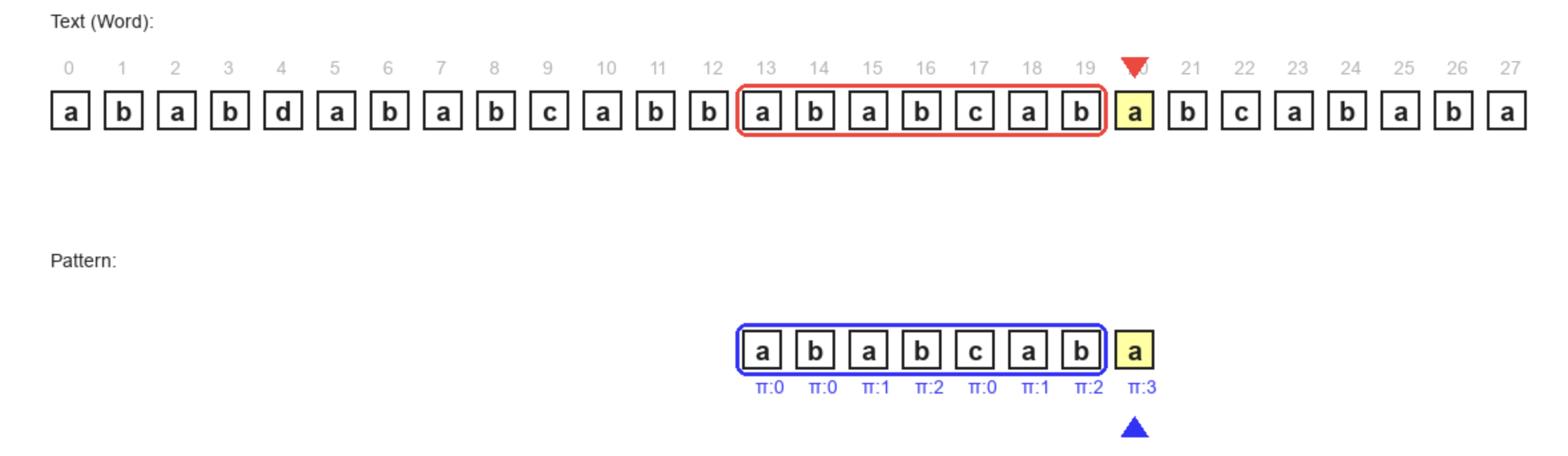
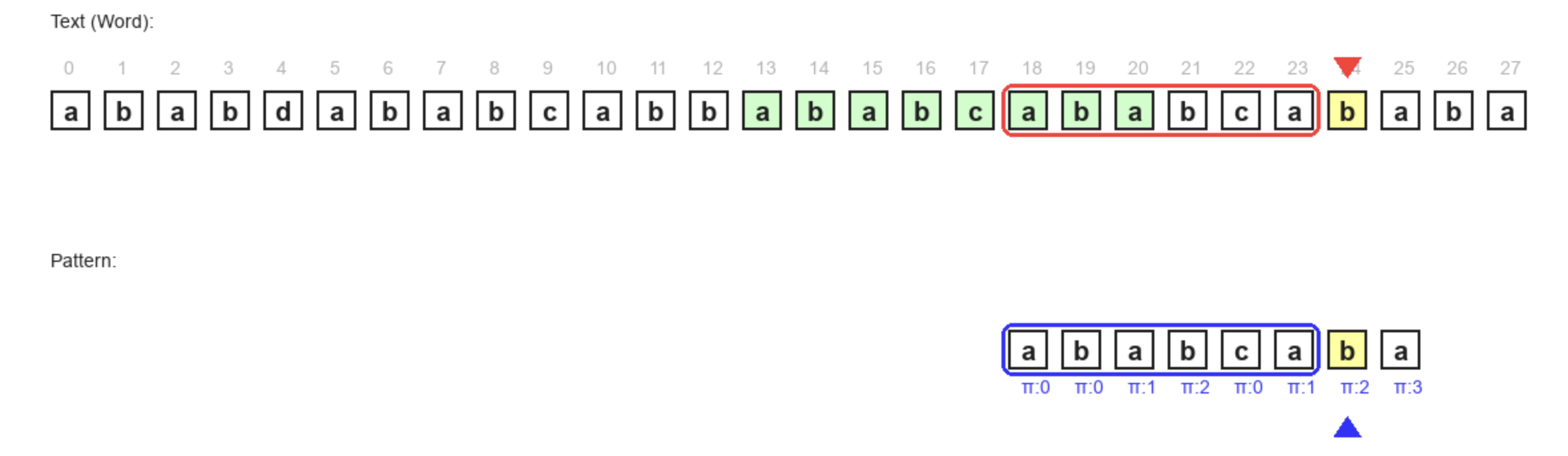
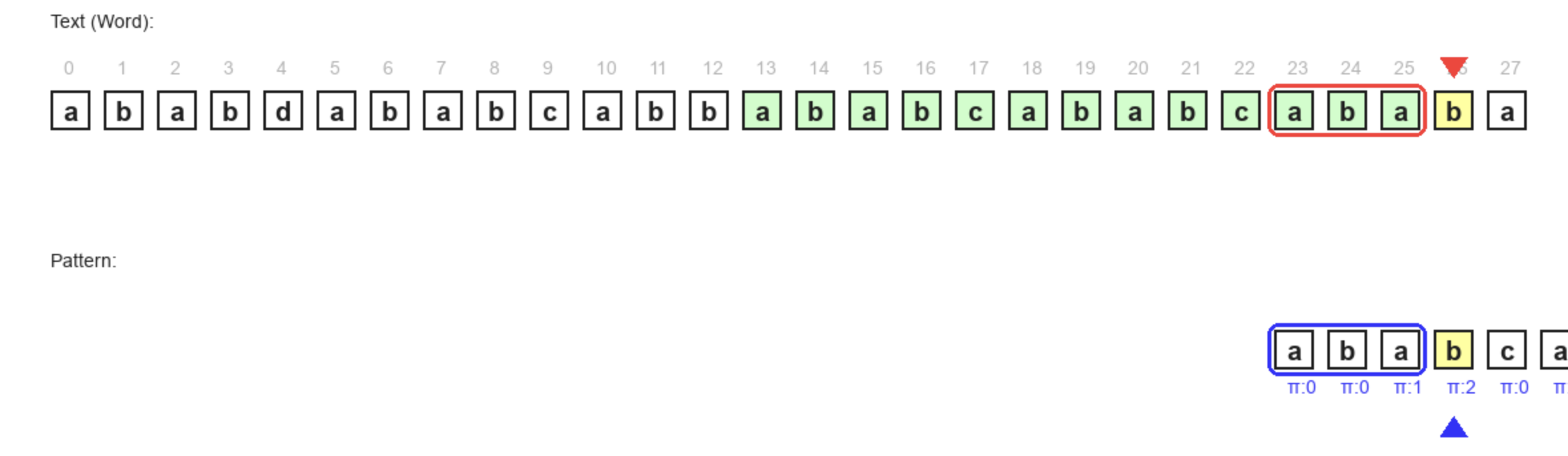
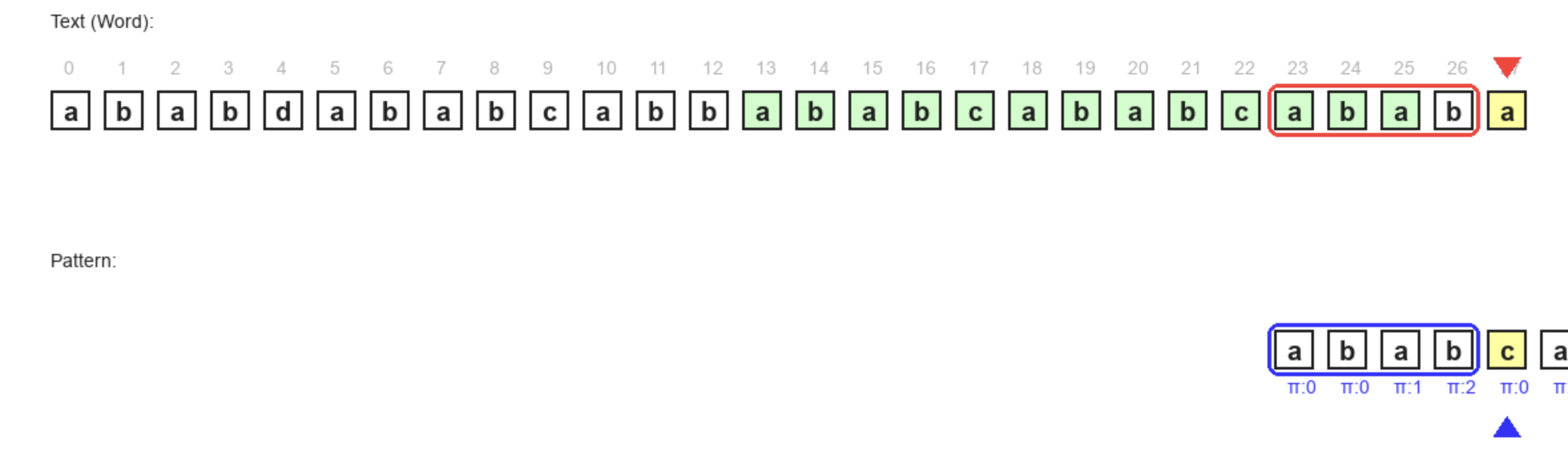
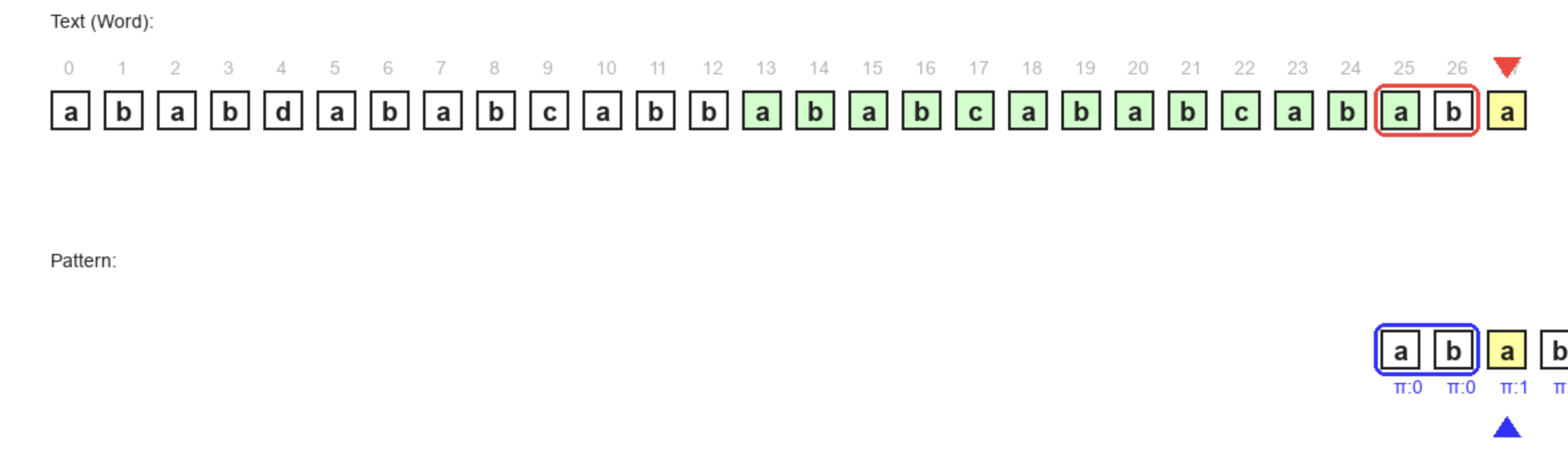
이 알고리즘의 설명은 글로서는 직관적으로 와닿지 않기 때문에 그림을 보면 좋을 것 같다. 해당 그림을 보고 이해한 다음에 코드를 암기하면 좋을 것 같다.
디버깅
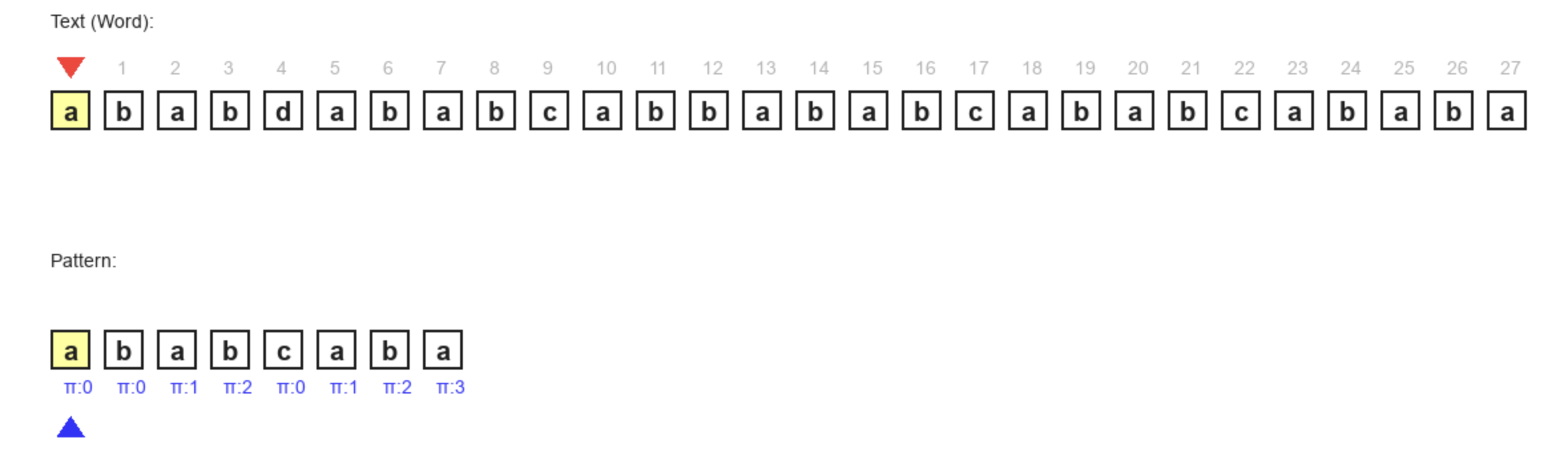
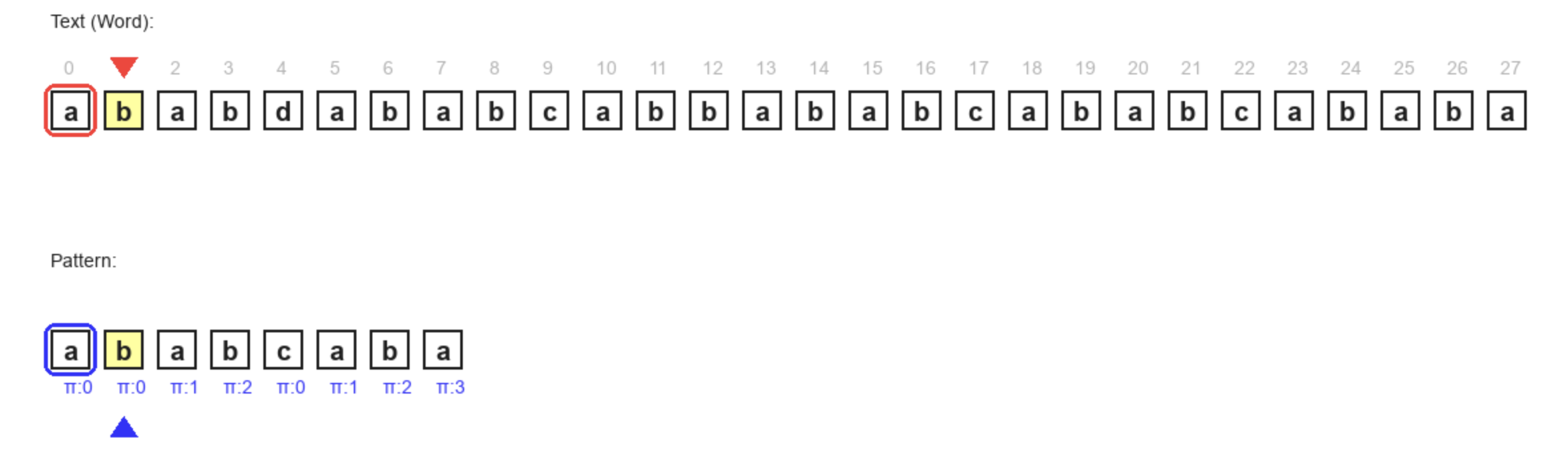
전체 문자열과 비교하려는 패턴을 차례대로 비교한다. 문자가 같으면 각각의 인덱스를 1씩 증가한다.


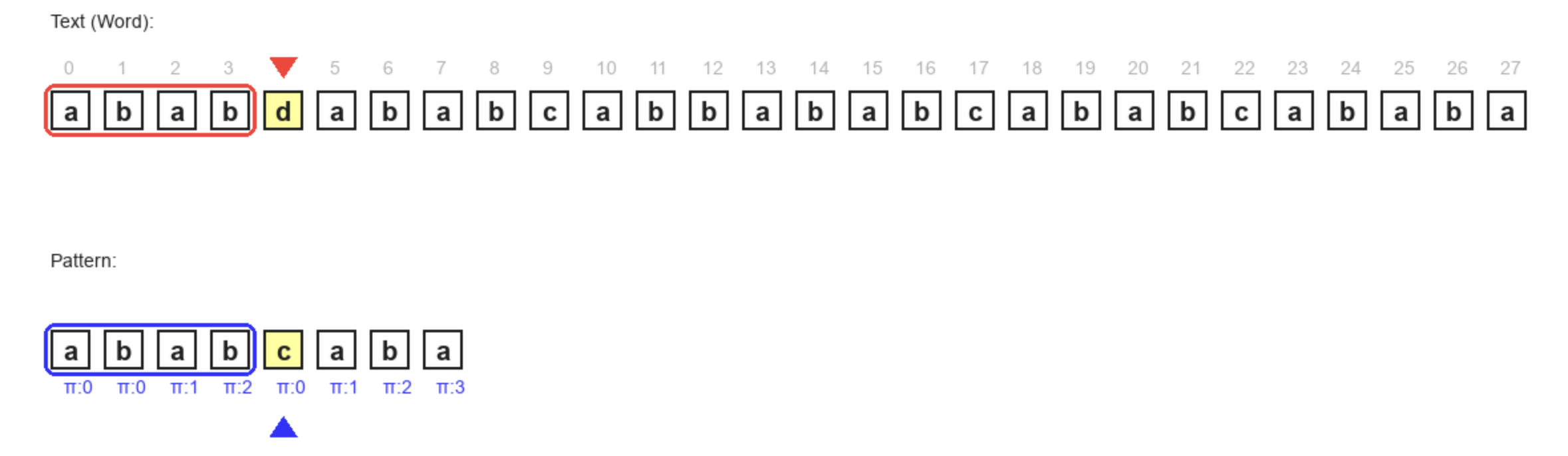
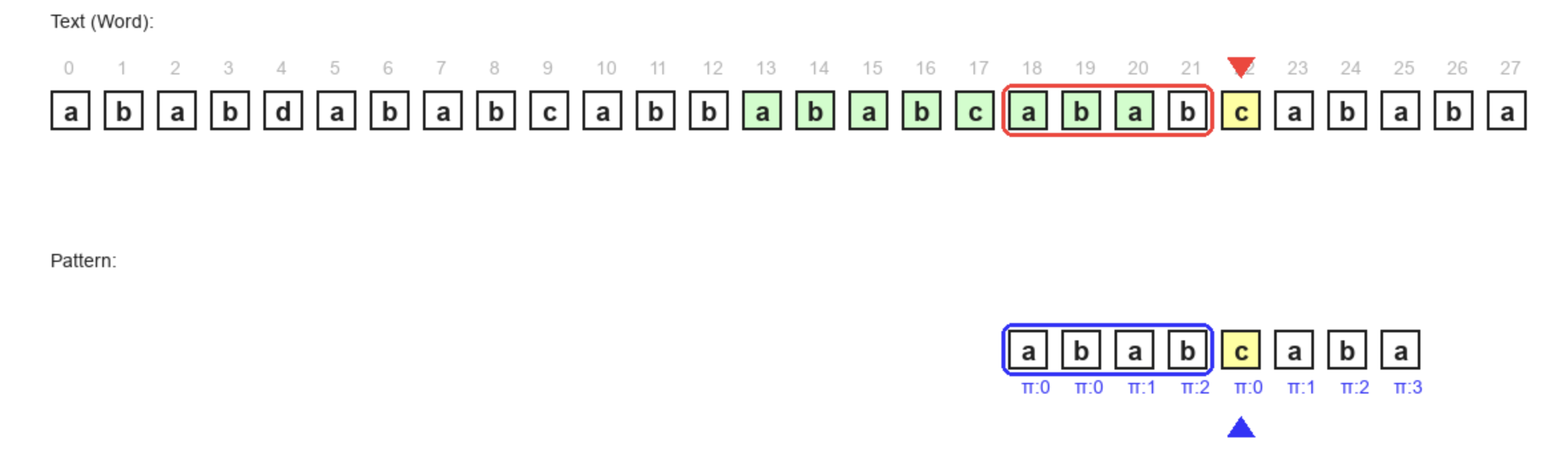
해당 단계에서 다른 문자열을 만났다. 그러면 지금 비교하고 있는 문자의 "인덱스 - 1"을 한 pi의 값으로 인덱스를 변경해준다.
p = pi[p - 1]; // p: pattern의 인덱스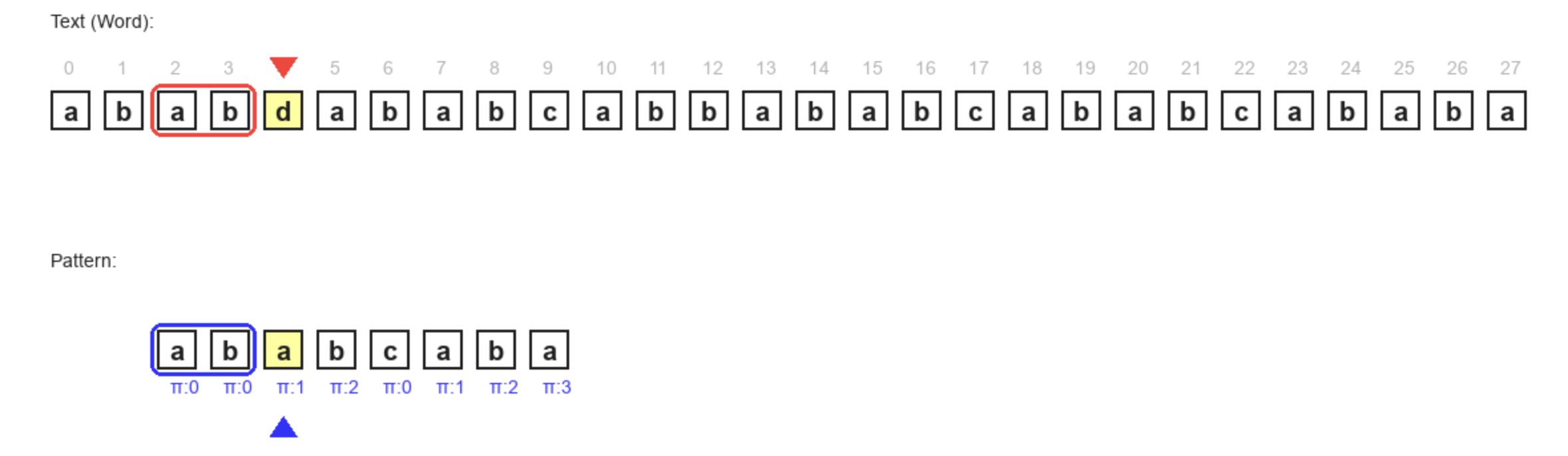
이렇게 업데이트를 하게 되면, 업데이트 하기 전의 비교하던 부분의 패턴에서 중복 비교를 피할 수가 있다. "abab"까지는 패턴이 일치한데, 이 패턴에서 뒷 부분 "ab"는 앞 부분 "ab"와 같으므로, 앞부분 "ab"를 다시 볼 필요가 없는 것이다. 원문 text의 뒷 부분 "ab"를 봤을 때 패턴의 앞 부분 "ab"랑 일치하기 때문이다.
만약 "ababc"의 패턴이 같은 상태인데, 다음 상태인 "ababca"에서 비교하고 틀리게 되면 pi[p-1] = 0으로 처음부터 비교해야 한다. 왜냐하면 비교하던 패턴의 뒷부분과 비교 당하는 텍스트의 앞부분에 동일한 문자열이 없기 때문이다.
그리고 추가적으로, p = pi[p -1]은 j>0일 때 까지 반복하는데, 비교하는 문자가 같을 때 까지 반복한다. 업데이트하면서 p의 인덱스도 바뀌기 때문에 처음으로 가지 않고도, 일치할 수도 있기 때문이다.
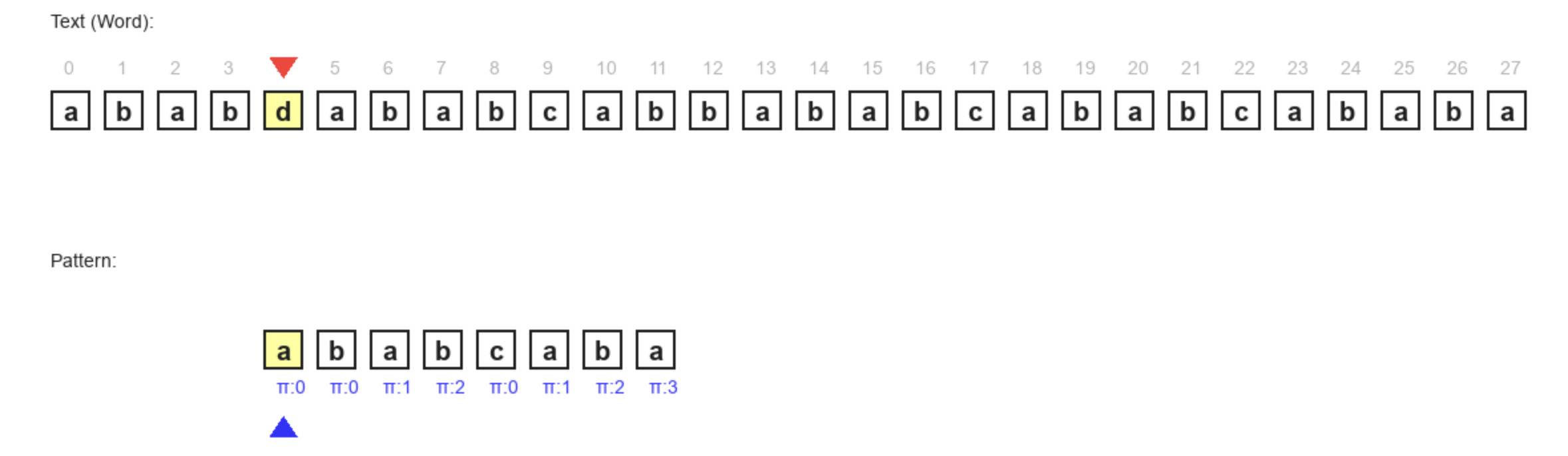
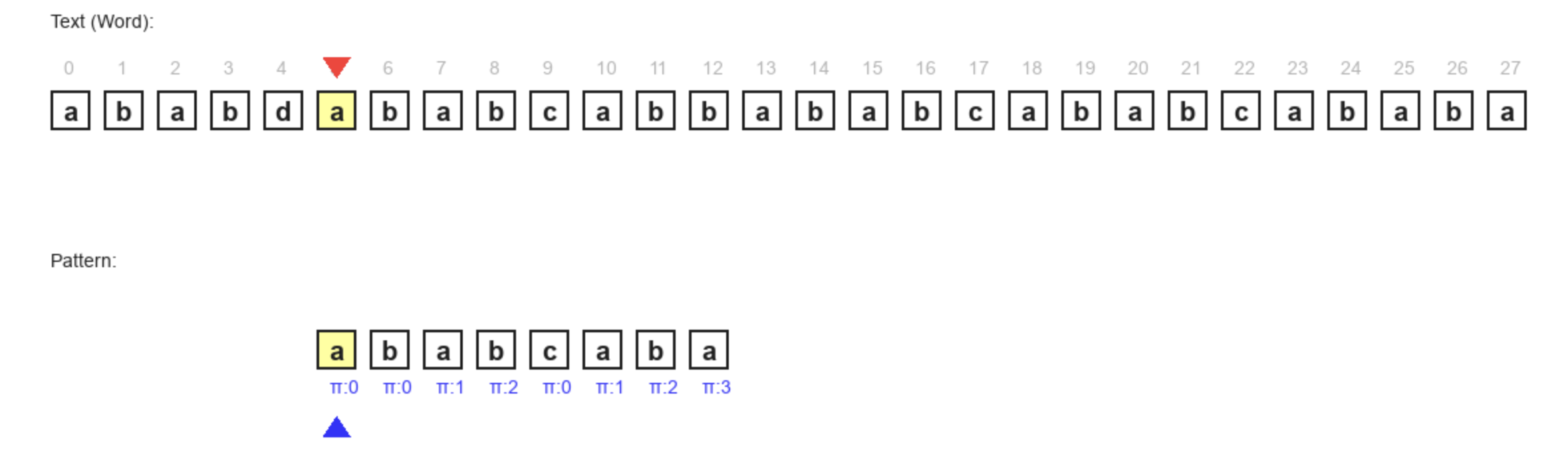
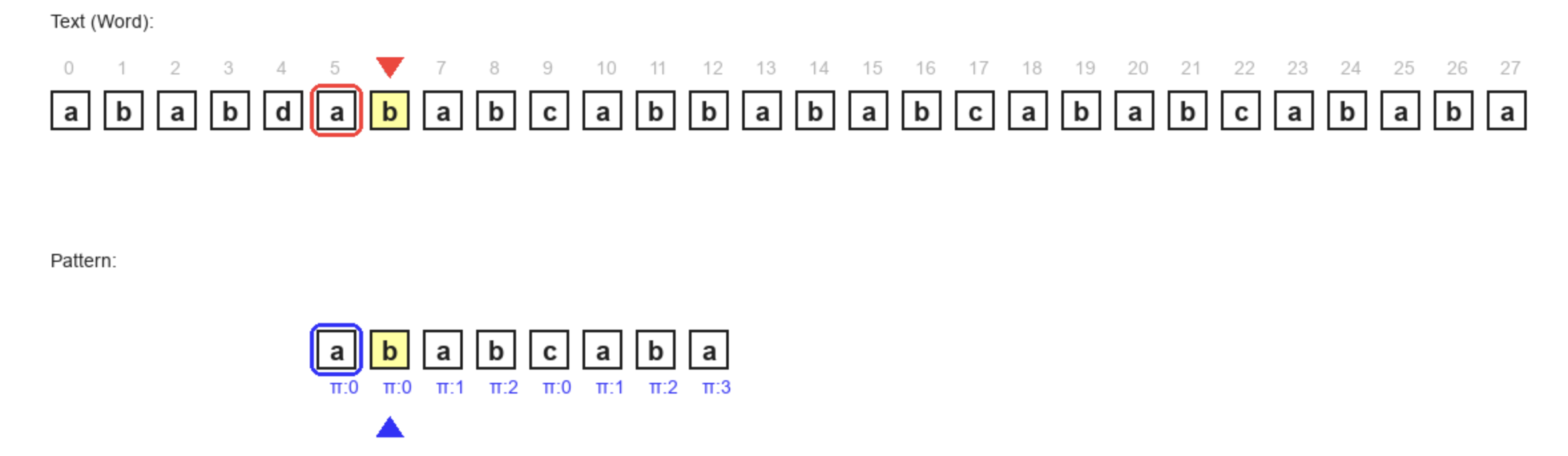



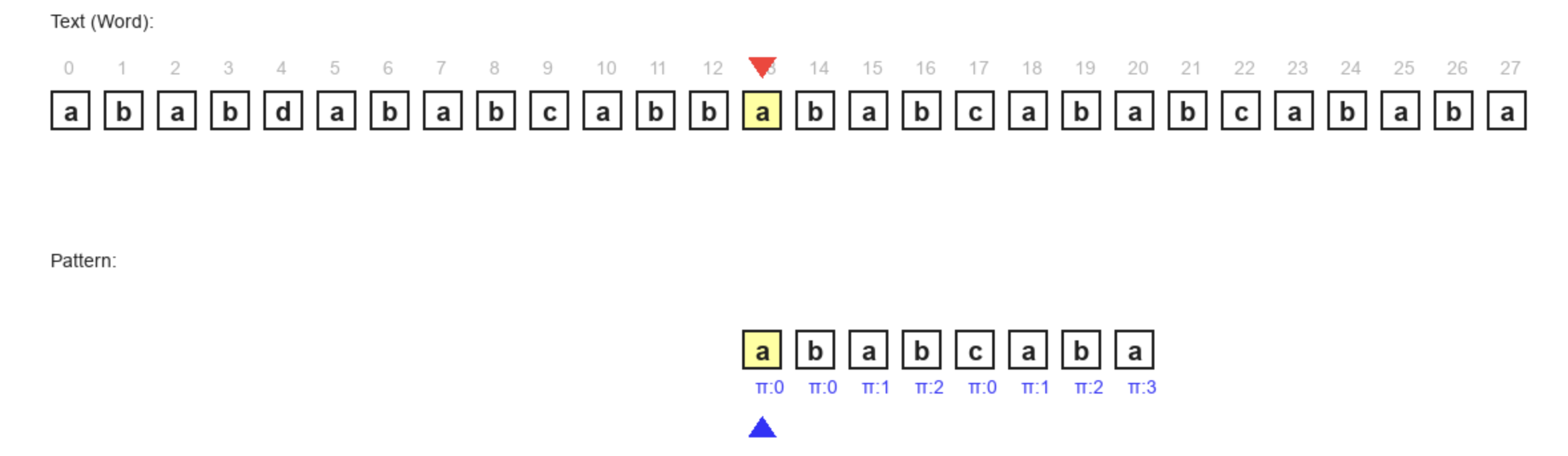

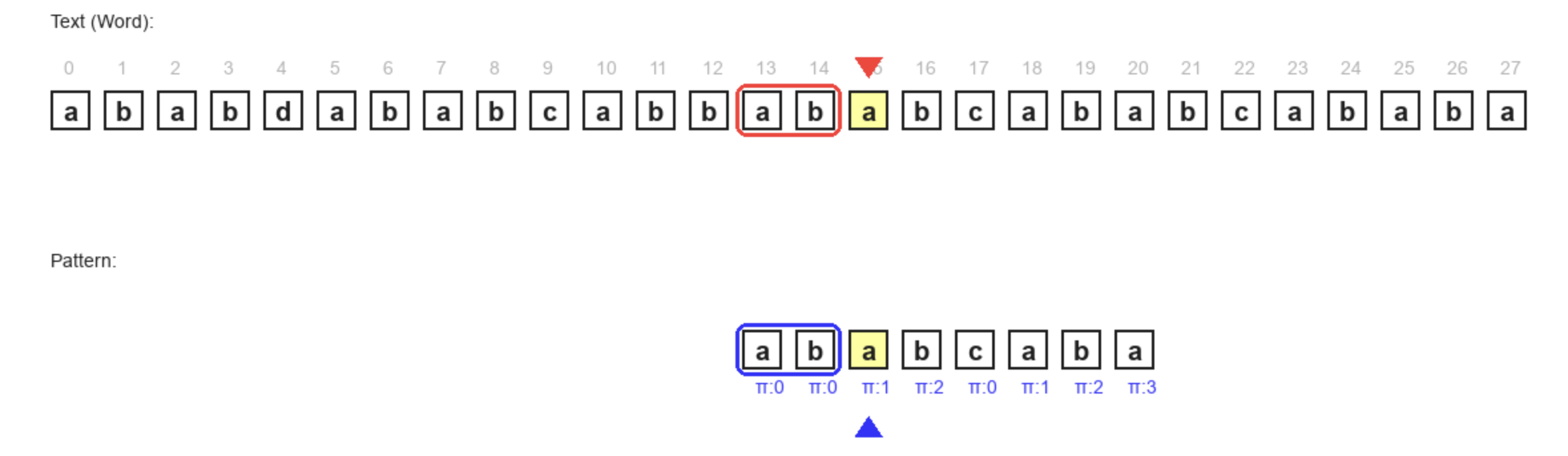

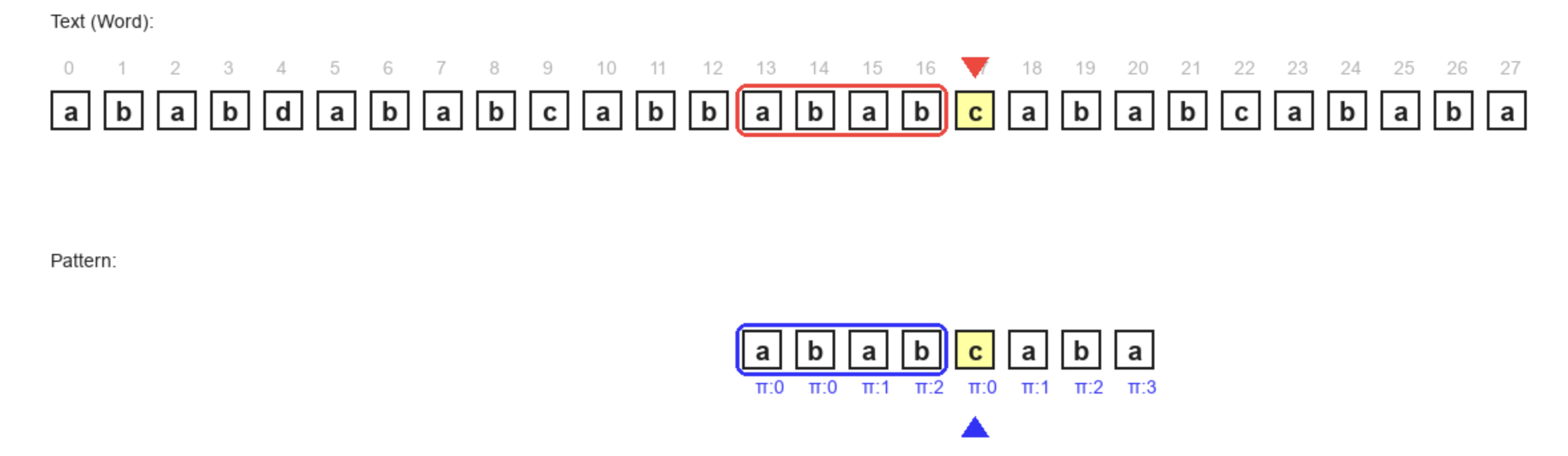
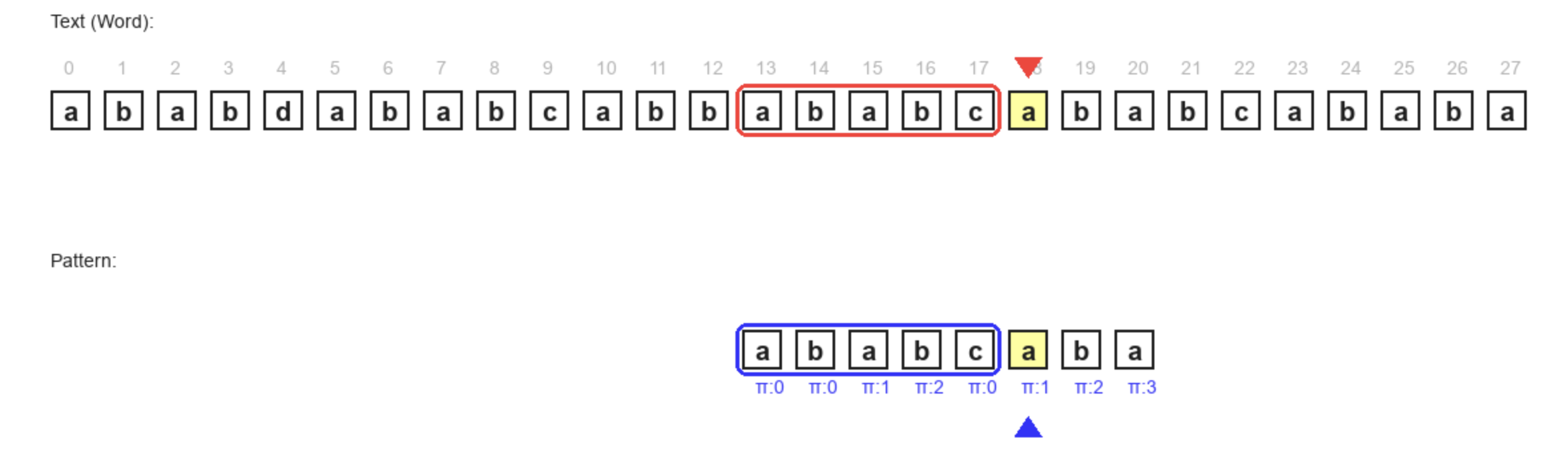

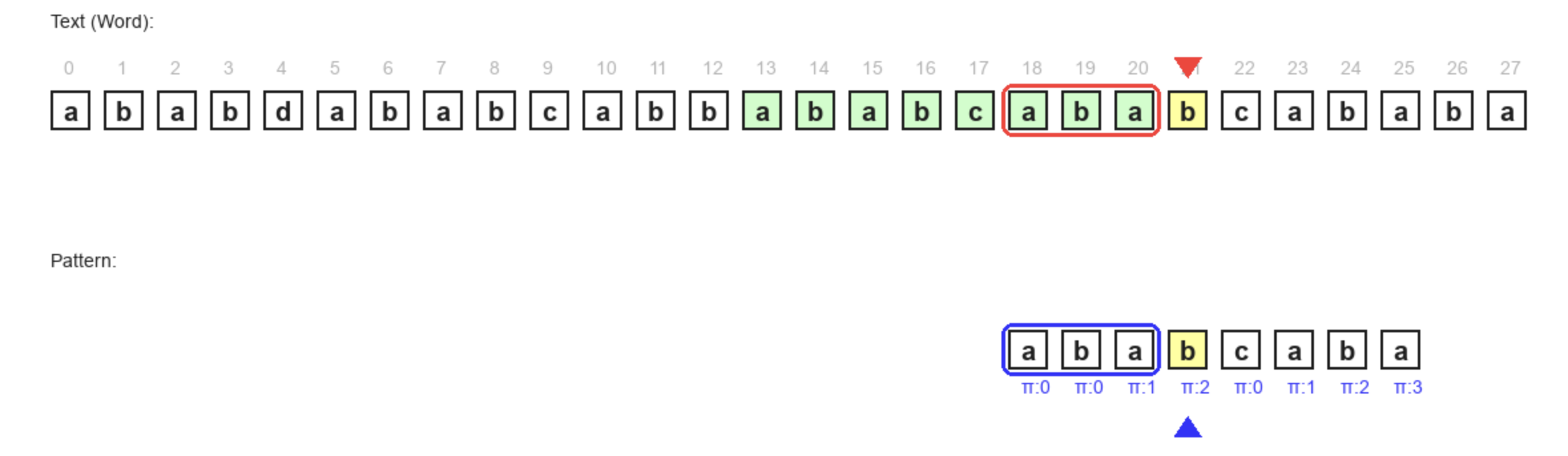
이 때 p는 똑같은 매커니즘으로 중복되는 문자열을 피하기 위해서 이전으로 가면 되는데, p = pi[p] 로 가면된다. 왜 p - 1이 아닌가 하면, 그 이유는 p += 1로 더하지 않았기 때문이다.
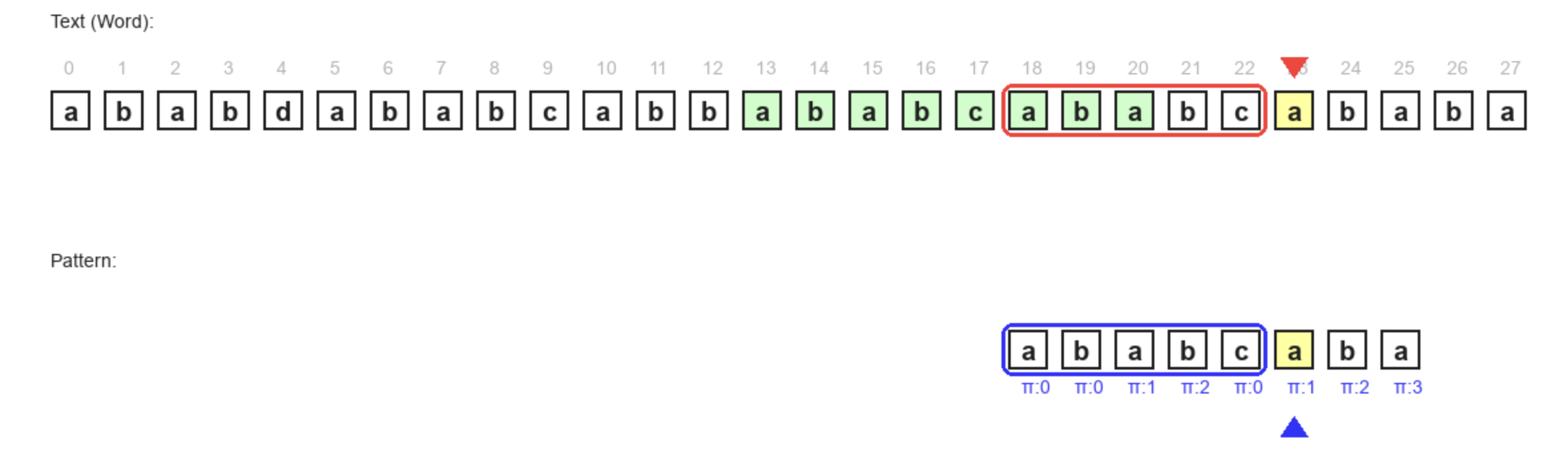


코드 및 시각화
#include <iostream>
#include <vector>

using namespace std;

vector<int> create_pi(string pattern) {
    int pattern_len = pattern.size();
    vector<int> pi(pattern_len, 0);

    int j = 0;
    for (int i = 1; i < pattern_len; i++) {
        while (j > 0 && pattern[i] != pattern[j]) {
            j = pi[j - 1];
        }
        if (pattern[i] == pattern[j]) {
            pi[i] = ++j;
        }
    }
    return pi;
}

void kmp(string word, string pattern) {
    vector<int> pi = create_pi(pattern);
    for (auto &p : pi) {
        printf("%d ", p);
    }
    cout << "\n";

    int w_len = word.size();
    int p_len = pattern.size();

    int matched_cnt = 0;
    vector<int> matched_idx;

    int p = 0;

    for (int w = 0; w < word.size(); w++) {
        while (p > 0 && word[w] != pattern[p]) {
            p = pi[p - 1];
        }

        if (word[w] == pattern[p]) {
            if (p == p_len - 1) {
                matched_cnt++;
                matched_idx.push_back(w - p_len + 1);
                p = pi[p];
            } else {
                p++;
            }
        }
    }
    cout << matched_cnt;
    cout << "\n";
    for (auto &mi : matched_idx) {
        printf("%d ", mi);
    }
    cout << "\n";
}

int main() {
    kmp("ababdababcabbababcababcababa", "ababcaba");
    return 0;
}
아래 코드는 python으로 실행시키면 하나씩 디버깅해볼 수 있다.
import pygame
import sys

WHITE = (255, 255, 255)
BLACK = (30, 30, 30)
RED = (255, 50, 50)     # Mismatch / Current Word Char
BLUE = (50, 50, 255)    # Match / Current Pattern Char
YELLOW = (255, 255, 150)  # Highlight comparison
GREEN = (0, 150, 0)     # Full Match
GRAY = (180, 180, 180)


class KMPSearchVisualizer:
    def __init__(self, text, pattern):
        # 1. Initialize Pygame Setup
        pygame.init()
        self.width = 1400
        self.height = 700
        self.screen = pygame.display.set_mode((self.width, self.height))
        pygame.display.set_caption("KMP Search Visualization")

        self.font = pygame.font.SysFont("arial", 20, bold=True)
        self.msg_font = pygame.font.SysFont("arial", 14)

        self.text = text
        self.pattern = pattern
        self.n = len(text)
        self.m = len(pattern)

        # Precompute PI table
        self.pi = self.compute_pi(pattern)

        # 2. Initialize State Variables
        self.reset_state()

    def compute_pi(self, p):
        m = len(p)
        pi = [0] * m
        j = 0
        for i in range(1, m):
            while j > 0 and p[i] != p[j]:
                j = pi[j-1]
            if p[i] == p[j]:
                j += 1
                pi[i] = j
        return pi

    def reset_state(self):
        self.w = 0  # index for text
        self.p = 0  # index for pattern
        self.found_indices = []
        self.message = "Press SPACE to step through | Press R to Reset"
        self.done = False
        self.state = "compare"  # compare, mismatch, match_found, p_increment

    def draw(self):
        self.screen.fill(WHITE)

        box_size = 30
        margin = 10

        # Center the visualization based on text length
        total_text_width = self.n * (box_size + margin) - margin
        start_x = (self.width - total_text_width) // 2
        text_y = 220
        pattern_y = 400

        # --- Draw Match Borders (Text & Pattern) ---
        if not self.done and self.p > 0:
            padding = 5

            # Text Matched Segment (Red Border)
            # From index (w - p) to (w - 1)
            t_start_idx = self.w - self.p
            t_end_idx = self.w - 1

            t_x1 = start_x + t_start_idx * (box_size + margin)
            t_x2 = start_x + t_end_idx * (box_size + margin) + box_size

            text_border_rect = pygame.Rect(
                t_x1 - padding,
                text_y - padding,
                (t_x2 - t_x1) + 2*padding,
                box_size + 2*padding
            )
            pygame.draw.rect(self.screen, RED,
                             text_border_rect, 3, border_radius=8)

            # Pattern Matched Segment (Blue Border)
            # From index 0 to (p - 1)
            # Visually, Pattern[0] is at same X as Text[w-p] due to shift
            p_start_idx = 0
            p_end_idx = self.p - 1

            # Calculate visual X for pattern (which matches text visualization)
            # Pattern is shifted by (w - p)
            shift = self.w - self.p
            p_x1 = start_x + (shift + p_start_idx) * (box_size + margin)
            p_x2 = start_x + (shift + p_end_idx) * \
                (box_size + margin) + box_size

            pat_text_rect = pygame.Rect(
                p_x1 - padding,
                pattern_y - padding,
                (p_x2 - p_x1) + 2*padding,
                box_size + 2*padding
            )
            pygame.draw.rect(self.screen, BLUE, pat_text_rect,
                             3, border_radius=8)

        # --- Draw Text (Word) ---
        self.draw_text_label("Text (Word):", (start_x, text_y - 60), BLACK)
        for i in range(self.n):
            x = start_x + i * (box_size + margin)
            rect = pygame.Rect(x, text_y, box_size, box_size)

            # Highlight current comparison in Text
            if i == self.w and not self.done:
                if self.state in ["compare", "match_found", "mismatch"]:
                    color = YELLOW
                    pygame.draw.rect(self.screen, color, rect)

            # Highlight found matches
            for match_start in self.found_indices:
                if match_start <= i < match_start + self.m:
                    pygame.draw.rect(
                        self.screen, (200, 255, 200), rect)  # Light Green

            pygame.draw.rect(self.screen, BLACK, rect, 2)

            char_text = self.font.render(self.text[i], True, BLACK)
            text_rect = char_text.get_rect(
                center=(x + box_size//2, text_y + box_size//2))
            self.screen.blit(char_text, text_rect)

            # Index numbers
            idx_text = self.msg_font.render(str(i), True, GRAY)
            self.screen.blit(idx_text, (x + box_size//2 - 5, text_y - 25))

        # --- Draw Pattern (Shifted) ---
        # The pattern is effectively at position (w - p) relative to the text
        # shift_index corresponds to where pattern[0] aligns with text[shift_index]
        shift_index = self.w - self.p

        self.draw_text_label("Pattern:", (start_x, pattern_y - 60), BLACK)

        for j in range(self.m):
            # Calculate x position relative to the matched text position
            # Pattern[j] aligns with Text[shift_index + j]
            current_text_idx = shift_index + j

            # Draw only if within screen bounds (roughly) or logical bounds
            x = start_x + current_text_idx * (box_size + margin)

            rect = pygame.Rect(x, pattern_y, box_size, box_size)

            # Highlight current comparison in Pattern
            if j == self.p and not self.done:
                if self.state in ["compare", "match_found", "mismatch"]:
                    color = YELLOW
                    pygame.draw.rect(self.screen, color, rect)

            pygame.draw.rect(self.screen, BLACK, rect, 2)

            char_text = self.font.render(self.pattern[j], True, BLACK)
            text_rect = char_text.get_rect(
                center=(x + box_size//2, pattern_y + box_size//2))
            self.screen.blit(char_text, text_rect)

            # PI value below pattern
            pi_val = self.pi[j]
            pi_text = self.msg_font.render(f"π:{pi_val}", True, BLUE)
            self.screen.blit(pi_text, (x + 10, pattern_y + box_size + 5))

        # --- Draw Pointers ---
        if not self.done:
            # Pointer for Text[w]
            w_x = start_x + self.w * (box_size + margin) + box_size // 2
            self.draw_pointer(w_x, text_y - 10, RED, "w", direction="down")

            # Pointer for Pattern[p]
            # Pattern[p] is drawn at Text[shift_index + p] -> Text[w - p + p] -> Text[w]
            # So visually they align vertically
            p_x = w_x  # Because pattern is shifted to align p with w
            self.draw_pointer(p_x, pattern_y + box_size +
                              35, BLUE, "p", direction="up")

        # --- UI Text ---
        self.draw_text_label("KMP Search Visualization",
                             (self.width//2, 50), BLACK, center=True, size=40)
        self.draw_text_label(self.message, (self.width//2,
                             550), BLACK, center=True, size=28)
        self.draw_text_label(
            f"Matches found at indices: {self.found_indices}", (self.width//2, 600), GREEN, center=True)
        self.draw_text_label("Space: Next Step | R: Reset",
                             (self.width//2, 650), GRAY, center=True)

        pygame.display.flip()

    def draw_text_label(self, text, pos, color, center=False, size=22):
        font = pygame.font.SysFont(
            "arial", size) if size != 22 else self.msg_font
        img = font.render(text, True, color)
        if center:
            rect = img.get_rect(center=pos)
            self.screen.blit(img, rect)
        else:
            self.screen.blit(img, pos)

    def draw_pointer(self, x, y, color, label, direction="down"):
        if direction == "down":
            pygame.draw.polygon(self.screen, color, [
                                (x, y), (x-10, y-15), (x+10, y-15)])
            # pygame.draw.line(self.screen, color, (x, y-10), (x, y-30), 3)
            # self.draw_text_label(label, (x - 10, y - 50), color)
        else:
            pygame.draw.polygon(self.screen, color, [
                                (x, y), (x-10, y+15), (x+10, y+15)])
            # pygame.draw.line(self.screen, color, (x, y+10), (x, y+30), 3)
            # self.draw_text_label(label, (x - 10, y + 35), color)

    def step(self):
        if self.w >= self.n:
            self.done = True
            self.message = "Search Finished!"
            return

        if self.state == "compare":
            if self.text[self.w] == self.pattern[self.p]:
                # Characters match
                if self.p == self.m - 1:
                    # Full pattern match!
                    self.message = f"Full Match Found at index {self.w - self.m + 1}!"
                    self.found_indices.append(self.w - self.m + 1)
                    self.state = "match_found"
                else:
                    self.message = f"Match! '{self.text[self.w]}' == '{self.pattern[self.p]}'. Advance both."
                    # We will advance in the next step logic or update state to advance
                    # To show the match state briefly, we can just do the update
                    self.w += 1
                    self.p += 1
            else:
                # Mismatch
                self.message = f"Mismatch! '{self.text[self.w]}' != '{self.pattern[self.p]}'."
                self.state = "mismatch"

        elif self.state == "match_found":
            # After a full match, we normally shift pattern based on pi
            self.message = f"Pattern Shift: p becomes pi[{self.p}] = {self.pi[self.p]}"
            self.p = self.pi[self.p]
            # w stays same to compare p_new with w_current?
            # Wait, KMP usually increments w after a match check?
            # Standard:
            # if text[w] == pattern[p]: w++, p++
            # if p == m: CNT++; p = pi[p-1] (Wait, pi of last matched index)
            # Let's check my logic.
            # If I entered match_found, it means p was m-1 and we matched text[w].
            # So effectively w++, p++ happened hypothetically but p hits limit.
            # Actually, if p == m-1 and matched:
            # record match.
            # p = pi[p]. (Wait, usually p is reset to pi[p] or pi[p-1]?)
            # Let's look at standard code:
            # if word[w] == pat[p]:
            #    if p == p_len - 1:
            #       found!
            #       p = pi[p]
            #    else: p++
            # So w is always incremented in the outer loop (for loop).
            # In my step logic, I don't have an outer loop. I control w manually.
            # So if matched (p==m-1), we consume w (w++ implicitly at end of loop iteration).

            # But here I haven't incremented w yet in the "match_found" branch of compare state.
            # Let's align with the loop logic:
            # Loop w from 0 to n-1.
            #   while p>0 and text[w] != pat[p]: p = pi[p-1]
            #   if text[w] == pat[p]:
            #       if p == m-1: found; p = pi[p];
            #       else: p++

            # My step logic handles the 'while' and 'if' discretely.

            # Let's restart step logic to reflect the 'while' loop properly.
            pass

    def step_v2(self):
        if self.w >= self.n:
            self.done = True
            self.message = "Search Finished!"
            return

        # We need a state machine that follows the loop structure
        # State 1: Mismatch handling (while loop)
        # State 2: Check match (if statement)

        # Current chars to compare: text[self.w] vs pattern[self.p]

        if self.p > 0 and self.text[self.w] != self.pattern[self.p]:
            # Mismatch case where we can shift pattern
            self.message = f"Mismatch! '{self.text[self.w]}' != '{self.pattern[self.p]}'. Shift p to pi[{self.p-1}] ({self.pi[self.p-1]})"
            self.p = self.pi[self.p - 1]
            # We stay at same w, next step will check while condition again
            return

        # If we exit the while loop (p==0 or text[w] == pattern[p])

        if self.text[self.w] == self.pattern[self.p]:
            if self.p == self.m - 1:
                # Full Match
                match_pos = self.w - self.m + 1
                self.found_indices.append(match_pos)
                self.message = f"FOUND MATCH at {match_pos}! Adjust p to pi[{self.p}] ({self.pi[self.p]})"
                self.p = self.pi[self.p]
                self.w += 1  # Move to next char in text
            else:
                # Partial Match
                self.message = f"Match! '{self.text[self.w]}' == '{self.pattern[self.p]}'. Advance w and p."
                self.p += 1
                self.w += 1
        else:
            # text[w] != pattern[p] AND p == 0
            # This means first char didn't match. Just advance w.
            self.message = f"Mismatch at start. Advance w."
            self.w += 1

    def run(self):
        clock = pygame.time.Clock()
        while True:
            for event in pygame.event.get():
                if event.type == pygame.QUIT:
                    pygame.quit()
                    sys.exit()
                if event.type == pygame.KEYDOWN:
                    if event.key == pygame.K_SPACE:
                        self.step_v2()
                    if event.key == pygame.K_r or event.unicode == 'ㄱ':
                        self.reset_state()
            self.draw()
            clock.tick(30)


if __name__ == "__main__":
    # Example Usage
    text_val = "ababdababcabbababcababcababa"
    pat_val = "ababcaba"

    # Or from command line args if offered, but hardcoding for demo is fine
    if len(sys.argv) > 2:
        text_val = sys.argv[1]
        pat_val = sys.argv[2]

    visualizer = KMPSearchVisualizer(text_val, pat_val)
    visualizer.run()
참고 자료
1. Bull. (2026. 02. 02). [Algorithm] KMP 알고리즘을 알기 전에 LPS에 대해 알아보기. Bull. https://codcost.tistory.com/351
2. 민규링. (2024. 10. 10). [알고리즘] 패턴 매칭 알고리즘, KMP 알고리즘 (Knuth–Morris–Pratt Algorithm). 민규의 흔적. https://ymg5218.tistory.com/152
3. bowbowbow. (2016. 1. 17). KMP : 문자열 검색 알고리즘. 멍멍멍. https://bowbowbow.tistory.com/6
'Algorithm > Theory' 카테고리의 다른 글
| [Algorithm] KMP 알고리즘을 알기 전에 LPS에 대해 알아보기 (0) | 2026.01.29 |
|---|---|
| [Algorithm::Sort] Quick Sort (with Randomized) 시험 요약 (1) | 2024.10.22 |
| [Data Structure] Priority Queue와 Heap Sort 시험 요약 (0) | 2024.10.21 |
| [Algorithm::Sort] Heap Sort 시험 요약 (0) | 2024.10.21 |
| [Algorithm::Sort] Merge Sort 시험 요약 (1) | 2024.10.21 |


