
| 일 | 월 | 화 | 수 | 목 | 금 | 토 |
|---|---|---|---|---|---|---|
| 1 | 2 | 3 | 4 | 5 | 6 | |
| 7 | 8 | 9 | 10 | 11 | 12 | 13 |
| 14 | 15 | 16 | 17 | 18 | 19 | 20 |
| 21 | 22 | 23 | 24 | 25 | 26 | 27 |
| 28 | 29 | 30 |
- study book
- rao
- ARM
- 파이토치 트랜스포머를 활용한 자연어 처리와 컴퓨터비전 심층학습
- llm을 활용 단어장 앱 개발일지
- 백준
- MATLAB
- MDP
- Kaggle
- Computer Architecture
- Widget
- fastapi를 사용한 파이썬 웹 개발
- system hacking
- C++
- Image Processing
- ML
- Algorithm
- Flutter
- 영상처리
- DART
- Stream
- BOF
- BAEKJOON
- Dreamhack
- PCA
- pytorch
- Got
- BFS
- FastAPI
- bloc
Bull
Demucs v4 음원 분리 모델: ONNX를 활용한 On-device 구현 본문
Why?
1. 왜 Demucs를 사용했는가?
출시 예정인 "애니 자동 번역 앱", 이제는 정말 배포를 하고 싶다. 하지만 핵심 서비스를 돈을 받고 이용하게 하는 거라, 최대한 불편함이나 오류 없이 배포하고 싶다. 현재로서는, 커다란 오류는 없지만 이전에 애니 동영상 대신 "음악"을 넣어서 자동 번역을 진행했더니, 제대로 작동하지 않음을 경험했다.
gpt 계열인 diarize 모델이 내부에서 배경 잡음을 없애는 걸로 알고는 있지만, 이 모델은 회의록에서 화자를 분리해주는 STT 모델이기 때문에, 정말 시끄러운 배경 소리는 제대로 잡음 제거를 할 수 없을 거 라고는 생각하고 있다. 위에서 말한 것 처럼 "음악"이 그 대표적 예시이다. 그래서 꼼꼼하게 더 확인하고 싶어서, "배경 분리도 없애주는 모델이 있을까?" 하는 생각에, Demucs 라는 모델을 찾았다. 음악에서 화자가 분리되는 특징이랑 애니메이션 영상 속, 일상이나 배경음에서 화자가 분리되는 특징이 조금은 다를 수 있다고 생각했지만, 괜찮을 것이라 생각하고 우선 이 모델을 골랐다.
2. 왜 On-device 인가?
철저히 Serverless를 지향하고 싶기 때문이다. 현재 만들고 있는 서비스에 들어간 STT와 LLM(Translation) 모델도 API 요청을 통해서 토큰 비용을 지불하고 서버는 사용하고 있지 않다. 후에, 추가적인 무언가가 필요하다면 Cloud나 집 PC로 확장할 계획은 있지만 아직 필요성을 느끼고 있지 않다. 게다가, 언제 어떤 방식으로 예외가 발생할 지 모르기 때문이다. 코딩은 "밑빠진 독에 물붓기" 라는 속담 처럼, 생각하지 못한 곳에서 예외가 발생하여 계속 유지보수를 해주어야 한다고 생각한다.
결론부터 말하자면, 내가 일반적인 방법으로 접근한 On-device 방식으로는 모델이 너무 커서 (300MB) 큰 음원 소스에 대해 OOM이 발생한다. 하지만 음원이 작다면 작동한다. 나의 아이폰(iPhone 16 Pro 기본) 기준으로 최대 1분 정도 가능하다. 긴 음성 파일에 대해서는 ffmpeg 같은 것을 통해 배치를 모델에 입력한 후 다시 합치는 과정을 거치면 사용 가능할 것으로 보인다. 또한 모델의 크기는 Quantization나 Prouning을 통해 모델을 줄인다면 가능성은 있을 것 같다. 추후 시간이 된다면 이 작업도 To-do List에 넣어 놓고 나중에 다시 해볼 생각이다.
분석 : ONNX 오류를 맞닥뜨리기 전, 이론과 사용 방법에 대하여
오픈소스를 통해 ONNX를 만드려고 했는데, 예상치 못한 오류를 만났다. 해당 모델은 torch를 통해 구현되어 있는데, 음성 신호가 모델에 입력되기 전에 STFT(Short-time Fourier transform)를 수행한다. 완벽한 표현은 아니지만 간단하게 설명하고 넘어간다. 보라색은 빨간색과 파란색을 섞으면 나온다. 그러면 보라색은 빨간색과 파란색으로 이루어져있다고도 말할 수 있다. 이 표현을 빗대어 말하자면, 신호도 하나의 파형으로 이루어진 것이 아니라, 주파수 대역별 여러 파형의 조합이라고 할 수 있다.
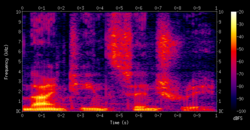
푸리에 변환으로 하나의 신호를 여러 주파수 대역으로 분리할 수 있다. 그런데 신호의 길이는 어디가 시작이고 끝인지 알 수 없다. 0~3초, 2~23초, 5~97초 모두 신호이다. 신호에도 기준점이 필요하다. 이 기준을 STFT로 잡은 것이다. 예를 들어 0~100초 신호가 있으면 이를 0~2초, 2~4초, ..., 98~100초의 간격으로 각각 푸리에 변환을 수행한다. 그러면 시간대별 분리된 신호들의 주파수를 나눌 수 있고 (Frequency, 1Hz, 2Hz, 3Hz, ...) 이 주파수 대역별 에너지가 얼마나 강한지도 알 수 있다. (진폭,dB, Energy, Amplitude)이를 시각화하여 나타낸 것이 Spectrogram이다.
"Hybrid Transformers for Music Source Separation"에 의하면, 모델은 시각화된 Spectrogram(주파수 영역)과 Waveform(시간 영역)을 입력으로 받으며 최종적으로 4개의 클래스 "drum", "bass", "vocal", "other instrument"로 분리된다. MUSDB18 dataset을 사용하였으며, 모델은 U-Net 구조를 유지하고 두 도메인 간의 cross-attention을 통해 정보를 공유한다. 가장 핵심은 모델의 Bottleneck이 Transformer Encoder 방식으로 이루어져 있다.
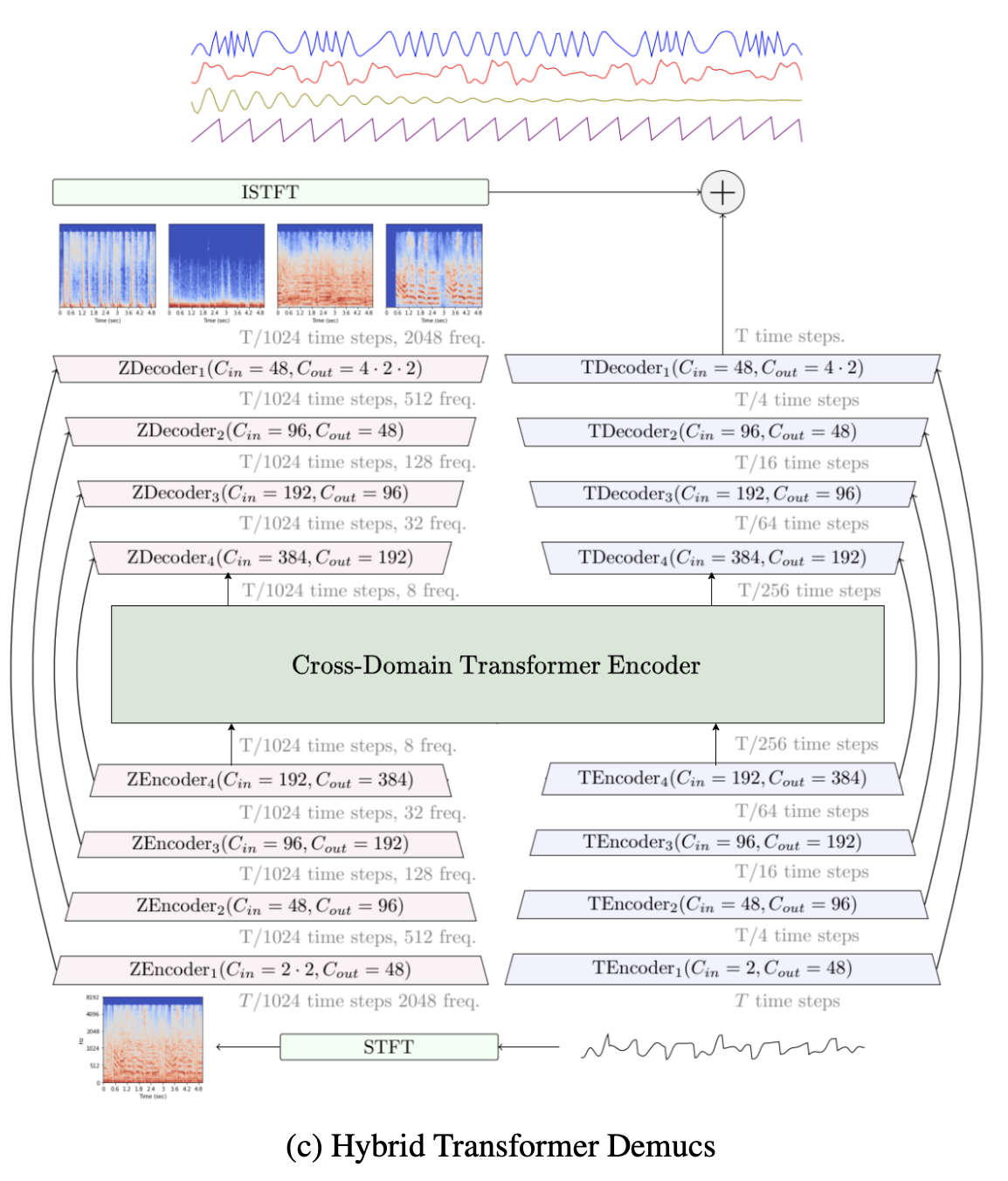
다시 돌아와서 `torch.stft`는 이 모델에 입력으로 들어가게 될 spectrogram을 만드는 것을 수행한다. 하지만 ONNX는 stft가 수행할 때 사용되는 복소수 연산을 지원하지 않는다. 이를 해결하기 위해 다운 받은 모델의 구조 코드를 고쳐서 직접 개선하였다. 다음은 코드 실행 및 해결 과정이다.
GitHub - facebookresearch/demucs at release_v4
Code for the paper Hybrid Spectrogram and Waveform Source Separation - facebookresearch/demucs
github.com
git clone -b release_v4 https://github.com/facebookresearch/demucs.git(ONNX가 필요한 방문자께서는 가장 아래 수정된 코드를 사용해주세요.)
Meta에서 개발한 `Demucs` 모델은 pip로 설치도 가능한데, 나는 코드 구경도 할 겸 전체 소스코드를 다운로드받았다. 그리고 ONNX가 무엇인지는 알고 있었으나, 실제로 이번이 처음 써보는 것이다. 또한 onnx 패키지로 코드를 직접 실행해야 되는 것으로 알고 있었다.
conda env update -f environment-cpu.yml  # if you don't have GPUs
conda env update -f environment-cuda.yml # if you have GPUs
conda activate demucs
pip install -e .
`README`에 친절하게 적혀있었다. 가상환경 덕분에 버전 충돌은 없었고 깔끔하게 잘 만들어진 것 같다. 설치가 무사히 수행되었으면 다음 명령어를 통해 작업을 수행할 수 있다. 오픈소스에는 test.mp3 샘플이 포함되어 있다. 나는 내가 좋아하는 음악을 넣었지만 포스트 작성을 위해 저작권 없는 NCS 음원을 사용하였다.
demucs [음성파일.mp3]다음과 같이 실행하면 "separated/htdemucs/[음성 파일]" 폴더 아래에 저장된다. 나의 결과는 다음과 같다.
[원본.mp3] デイドリーム (Daydream) RINZO, MAHIRU
[bass.wav] デイドリーム (Daydream) RINZO, MAHIRU
[drums.wav] デイドリーム (Daydream) RINZO, MAHIRU
[other.wav] デイドリーム (Daydream) RINZO, MAHIRU
[vocals.wav] デイドリーム (Daydream) RINZO, MAHIRU
기대 이상으로 매우 잘 추출된 것 같다. 이제 문제의 ONNX 추출이다. 우선 패키지 사용을 위해 다음 명령어를 진행하였다.
conda install onnxonnx 코드를 짜기 위해 실행되는 프로세스도 간략하게 설명해보고자 한다. 맨처음 `demucs` 명령어를 사용했지만, 이는 사실 python 스크립트를 패키지처럼 가공해 하나의 명령어 프로그램처럼 사용한 것이다. 그래서 `demucs/__main__.py`가 실행된다는 것을 알 수 있다. 이는 다시 `separate.py`를 실행하는데, 123번 째 줄에 있는 `get_model_from_args()`를 통해 인자에 모델이 선택되지 않으면 "htdemucs" 모델을 선택한다는 사실을 알 수 있다.
# pretrained.py

DEFAULT_MODEL = 'htdemucs'
# ...
def get_model_from_args(args):
    """
    Load local model package or pre-trained model.
    """
    if args.name is None:
        args.name = DEFAULT_MODEL
        print(bold("Important: the default model was recently changed to `htdemucs`"),
              "the latest Hybrid Transformer Demucs model. In some cases, this model can "
              "actually perform worse than previous models. To get back the old default model "
              "use `-n mdx_extra_q`.")
    return get_model(name=args.name, repo=args.repo)
이 때 `get_model()`을 실행해서 반환하는데 이것이 핵심 model을 불러와주는 모듈임을 알 수 있다. 여기서 repo 인자는 arg로 지정하지 않아 `None`이다.
다음과 같이 onnx를 뽑는 코드의 출발점을 작성할 수 있다.
# export_onnx.py

import torch
from demucs.pretrained import get_model

def export_to_onnx():
    model = get_model('htdemucs')

if __name__ == "__main__":
    export_to_onnx()
이어서 get_model()을 살펴본다.
# # pretrained.py

REMOTE_ROOT = Path(__file__).parent / 'remote'
# ...
def get_model(name: str,
              repo: tp.Optional[Path] = None):
    """`name` must be a bag of models name or a pretrained signature
    from the remote AWS model repo or the specified local repo if `repo` is not None.
    """
    if name == 'demucs_unittest':
        return demucs_unittest()
    model_repo: ModelOnlyRepo
    if repo is None:
        models = _parse_remote_files(REMOTE_ROOT / 'files.txt')
        model_repo = RemoteRepo(models)
        bag_repo = BagOnlyRepo(REMOTE_ROOT, model_repo)
    else:
        if not repo.is_dir():
            fatal(f"{repo} must exist and be a directory.")
        model_repo = LocalRepo(repo)
        bag_repo = BagOnlyRepo(repo, model_repo)
    any_repo = AnyModelRepo(model_repo, bag_repo)
    model = any_repo.get_model(name)
    model.eval()
    return model
인자로 어떤 값이 들어올 지 알기 때문에 `"if repo is None:"` 분기문이 실행됨을 알 수 있다. model은 해당 파일의 부모 디렉터리 아래에 있는 `remote/files.txt`에 정보가 들어 있는 것 같다. 해당 파일을 살펴보면 `.th`로 이루어진 텍스트들이 행 별로 적혀있다. 클래스 명을 보면 원격지를 통해 모델을 불러오는 듯 하다.
# pretrained.py

import typing as tp

ROOT_URL = "https://dl.fbaipublicfiles.com/demucs/"

def _parse_remote_files(remote_file_list) -> tp.Dict[str, str]:
    root: str = ''
    models: tp.Dict[str, str] = {}
    for line in remote_file_list.read_text().split('\n'):
        line = line.strip()
        if line.startswith('#'):
            continue
        elif line.startswith('root:'):
            root = line.split(':', 1)[1].strip()
        else:
            sig = line.split('-', 1)[0]
            assert sig not in models
            models[sig] = ROOT_URL + root + line
    return models
`#`은 주석, `root:` 는 해당 디렉터리 명을 가져오고, 나머지는 `-` 기준으로 첫 번째를 불러온다. 예를 들어, `42e558d4-196e0e1b.th`면 `model["42e558d4"] = "https://dl.fbaipublicfiles.com/demucs/" + "mdx_final/" + "42e558d4-196e0e1b.th"` 이다. `-` 기준 뒤에 `196e0e1b`는 이후 나오는 `check_checksum()`을 통해 `42e558d4`에 해시를 적용해 파일이 깨지지 않았는지 확인하는 용도이다.
# repo.py

class RemoteRepo(ModelOnlyRepo):
    def __init__(self, models: tp.Dict[str, str]):
        self._models = models

    def has_model(self, sig: str) -> bool:
        return sig in self._models

    def get_model(self, sig: str) -> Model:
        try:
            url = self._models[sig]
        except KeyError:
            raise ModelLoadingError(f'Could not find a pre-trained model with signature {sig}.')
        pkg = torch.hub.load_state_dict_from_url(
            url, map_location='cpu', check_hash=True)  # type: ignore
        return load_model(pkg)
`RemoteRepo.get_model()`이 호출되진 않았지만, 해당 함수는 `file.txt` 내용이 저장된 `self._models`과 `signature`를 통해 특정 모델의 가중치를 불러온다.
# repo.py

class BagOnlyRepo:
    """Handles only YAML files containing bag of models, leaving the actual
    model loading to some Repo.
    """
    def __init__(self, root: Path, model_repo: ModelOnlyRepo):
        self.root = root
        self.model_repo = model_repo
        self.scan()

    def scan(self):
        self._bags = {}
        for file in self.root.iterdir():
            if file.suffix == '.yaml':
                self._bags[file.stem] = file

    def has_model(self, name: str) -> bool:
        return name in self._bags

    def get_model(self, name: str) -> BagOfModels:
        try:
            yaml_file = self._bags[name]
        except KeyError:
            raise ModelLoadingError(f'{name} is neither a single pre-trained model or '
                                    'a bag of models.')
        bag = yaml.safe_load(open(yaml_file))
        signatures = bag['models']
        models = [self.model_repo.get_model(sig) for sig in signatures]
        weights = bag.get('weights')
        segment = bag.get('segment')
        return BagOfModels(models, weights, segment)
다음 함수인 `BagOnlyRepo.get_model()`이 `RemoteRepo.get_model()`을 호출한다. 초기화시 `scan()`이 호출된다. 초기화는 `AnyModelRepo(model_repo, bag_repo)`를 통해 되는데, `model_repo="htdemucs"`이기 때문에 `self._bags["htdemucs"] = "htdemucs.yaml"`이 된다. (stem은 확장자 뺀 이름) 이 파일에는 `models: ['955717e8']`이 적혀있는데 file.txt에 있는 모델 가중치를 말한다.
`get_model()`에서 리스트 컴프리헨션을 통해 해당 model의 문자열을 통해 `yaml`파일에 적힌 models 키의 값을 통해 여러 가중치를 불러온다. return 되는 `BagOfModels` 클래스에 여러 개의 가중치 정보를 넣어주는데 만약 2개 이상 있으면 이를 앙상블 기법을 통해 가중치를 평균내어 저장한다. 핵심 부분은 아니기에 자세한 사항은 `apply.py`의`apply_model()`를 확인하면 된다.
이 정보를 바탕으로 export_onnx.py를 다음과 같이 보완할 수 있다.
# export_onnx.py

import torch
from demucs.pretrained import get_model

def export_to_onnx():
    model = get_model('htdemucs')
    model = model.models[0]

if __name__ == "__main__":
    export_to_onnx()
onnx 런타임은 export()할 때 더미 입력 데이터를 흘려 보내어 모델의 구조를 저장한다. 즉, 입력이 들어가는 시점부터 모델의 연산을 모두 기록하는 것이다. 그래서`htdemucs.py`를 확인해보면, 입력 값은 `sample_late * sement = 44100 * 10 = 441000`이 된다. 그래서 음성 샘플이 10초보다 짧으면 forward()에서 0 패딩을 채워서 들어가게 된다.
그래서 입력 값은 10초 이하의 샘플레이트 곱으로 들어가면 되는데, 적당히 2초로 설정하였다.
# export_onnx.py

import torch
from demucs.pretrained import get_model

def export_to_onnx():
    model = get_model('htdemucs')
    model = model.models[0]

    channels = model.audio_channels
    length = int(model.samplerate * 2.0)
    length = model.valid_length(length)
    dummy_input = torch.randn(1, channels, length)
    onnx_path = "htdemucs.onnx"

    torch.onnx.export(
        model,
        dummy_input,
        onnx_path,
        opset_version=17,
        input_names=["input"],
        output_names=["output"],
        dynamic_axes={'input': {2: 'length'}, 'output': {3: 'length'}}
    )

if __name__ == "__main__":
export_to_onnx()- model의 입력 값은 알아서 10 * 441000로 패딩을 채우는 것을 확인했지만, 출력은 확인하지 못하였다. 그럼에도 `dynamic_axes` 속성을 주어, length의 길이가 동적이어도 상관없도록 설정하였다.
- opset_version은 공식 문서의 버전표에 따라 설정하면 된다.
Issue ① : ONNX는 torch.stft의 복소수 연산을 지원하지 않는다
torch.onnx.errors.SymbolicValueError:
STFT does not currently support complex types
[Caused by the value '634 defined in (%634 : Float(*, *, strides=[351232, 1], requires_grad=0, device=cpu)
= onnx::Reshape[allowzero=0](%624, %633), scope: demucs.htdemucs.HTDemucs::
# /home/bull-wsl/miniconda3/envs/demucs/lib/python3.9/site-packages/torch/functional.py:703:0)' (type 'Tensor') in the TorchScript graph.
The containing node has kind 'onnx::Reshape'.]
onnx 오류의 내용을 보면 `STFT`는 복소수 타입을 지원하지 않는다고 나온다. `stft()`는 아래 함수 영역에서 호출된다. torch 라이브러리에서 stft 계산을 지원해준다.
# spec.py

import torch as th

def spectro(x, n_fft=512, hop_length=None, pad=0):
    *other, length = x.shape
    x = x.reshape(-1, length)
    z = th.stft(x,
                n_fft * (1 + pad),
                hop_length or n_fft // 4,
                window=th.hann_window(n_fft).to(x),
                win_length=n_fft,
                normalized=True,
                center=True,
                return_complex=True,
                pad_mode='reflect')
    _, freqs, frame = z.shape
    return z.view(*other, freqs, frame)
stft의 공식을 보면 다음과 같다.
- $x[n + m \cdot H]$ : 입력 신호의 특정 구간을 선택
- $m$: 현재 분석 중인 시간 프레임 인덱스
- $H$ (Hop size): 윈도우를 얼마나 옆으로 밀면서 계산할 것인가
- $w[n]$ (Window Function - ex: Hanning, Hamming): 신호를 자를 때 양 끝단이 툭 끊기지 않도록 부드럽게 만들기
- $e^{-j \frac{2\pi}{N} kn}$ : 선택된 구간에서 주파수 $k$를 추출하기 위한 회전 인자
$e$는 오일러 공식에 의해 실수부인 $cos$과 허수부인 $sin$으로 나뉘게 된다.
에러를 다시 보면, `functional.py`에 703번 째 줄에 `TorchScript graph` 안에 `Tensor`의 타입이 complex인 건 지원하지 않는다고 나온다. 버전이 약간 상이할 수 있어 torch.stft의 681번 째 줄을 보면 `_VF.stft` 반환시 나오는 에러 같다.
실 계산 구현부를 찾기 위한 추적 파일은 다음과 같다.
→ torch/functional.py -- stft()
→ torch/_VF.py -- Aten
→ torch/jit/_builtins.py -- "aten::stft"
→ ATen/native/SpectralOps.cpp -- Tensor.stft()
그리고 해당 파일에 다음과 같은 코드가 있는데, 해당 부분에서 복소수 연산이 일어난다.
# SpectralOps.cpp

if (complex_fft) {
  out = at::_fft_c2c(input, input.dim() - 1, ...); // Complex-to-Complex FFT
} else {
  out = at::_fft_r2c(input, input.dim() - 1, ...); // Real-to-Complex FFT
}
이상 추적하려고 하였으나, 실제 연산은 cuda의 cuFTT 라이브러리를 통해 일어나고 오픈소스가 아니라서 추적을 멈추었다.
Breakthrough ① : STFT 연산을 직접 설계하기
onnx은 복소수 타입을 지원하지 않는다. 그런데, 복소수도 소수로 이루어져 있다. 다만 방식의 차이로 인해 복소수라는 표시를 해준다. 어떤 연산이 복소수라는 표시를 만나면 복소수만이 할 수 있는 연산을 하도록 설계된다. 그러나 type 자체로는 복소수로 지정이 된다. onnx는 complex가 아닌, float 만을 지원한다.
그러면 model 내부에서 복소수 타입을 반환하지 않으면 된다. `torch.stft()`가 `torch.complex64`와 같은 type을 반환한다. 이를 피하기 위해 stft를 연산 방식을 직접 구현해볼 수 있다.
STFT 구현부
stft를 구현하기 전에 output을 확인한다.
import torch as th
import torch.nn as nn

def spectro(x, n_fft=4096, hop_length=128, pad=0):
    *other, length = x.shape
    x = x.reshape(-1, length)
    z = th.stft(
        x,
        n_fft * (1 + pad),
        hop_length or n_fft // 4,
        window=th.hann_window(n_fft).to(x),
        win_length=n_fft,
        normalized=True,
        center=True,
        return_complex=True,
        pad_mode="reflect",
    )
    return z

x = th.randn(1, 16000)
z_torch = spectro(x)

label_w = 30
value_w = 30

print(f"{'[torch.stft - shape]':<{label_w}}{str(z_torch.shape):>{value_w}}")
print(f"{'[torch.stft - content]':<{label_w}}{str(z_torch[0, 0, 0]):>{value_w}}")
print(f"{'[torch.stft - content type]':<{label_w}}{str(z_torch.dtype):>{value_w}}")

# [torch.stft - shape]              torch.Size([1, 2049, 126])
# [torch.stft - content]                    tensor(0.2173+0.j)
# [torch.stft - content type]                  torch.complex64
`(batch, frequency, time frame)`으로 출력된다. 초반부에 푸리에 변환에 대해 설명하였다. 어떤 신호를 여러 신호(사인파)로 나누는데 그 사인파 주파수 `0Hz`, `10.77Hz`, `1076.6Hz`, ..., `22050Hz` (2049개, 나이퀴지스트, 44100Hz samplate)에 대해 복소수를 담은 것이다. 이 복소수는 다음 피타고라스 정리에 의해 진폭(Energy, Magnitude)를 구할 수 있다.
$$|z| = \sqrt{Real^2 + Imag^2}$$
`spectro()`는 복소수 값을 출력한다. 하지만 이를 그대로 구현하면 안된다. 왜냐하면 `htdemucs.py`에 있는 실제 model인 `HTDemucs`을 확인해보면, `forward()`에서 사용되는 `_spec()`에도 복소수 타입이 유지되기 때문이다. 즉, `_spec()`에서도 복소수를 사용하지 않도록 만들어야 한다.
# htdmucs.py

class HTDemucs(nn.Module):
	# ...
    def forward(self, mix):
        # ...
        z = self._spec(mix)
        mag = self._magnitude(z)
        x = mag
        # ...

    def _spec(self, x):
        hl = self.hop_length
        nfft = self.nfft
        x0 = x  # noqa
	assert hl == nfft // 4
        le = int(math.ceil(x.shape[-1] / hl))
        pad = hl // 2 * 3
        x = pad1d(x, (pad, pad + le * hl - x.shape[-1]), mode="reflect")
        z = spectro(x, nfft, hl)[..., :-1, :]
        assert z.shape[-1] == le + 4, (z.shape, x.shape, le)
        z = z[..., 2: 2 + le]
        return z
즉, `self._magnitude()` 단계에서 실수로 변환된다. 이러한 고려사항을 숙지하고 설계를 하면 다음과 같다.
- `spectro()`의 `stft`를 구현하되, 실수부와 허수부에 있는 숫자를 각각의 Tensor로 반환한다. `(batch, [실수부, 허수부], times)`
- 푸리에 변환의 summation 연산은 1D convolution과 유사하다. 따라서 `register_buffer()`를 사용해 텐서의 정보는 유지하되, 학습 gredient에서 제외시킬 수 있다.
1. 시간과 주파수 인덱스 생성
n = th.arange(n_fft, dtype=th.float32)
k = th.arange(n_fft // 2 + 1, dtype=th.float32)
$n \in \{0, 1, \dots, N-1\}$, $k \in \{0, 1, \dots, \frac{N}{2}\}$ 에서 $n$은 분석할 window의 시간 인덱스고 k는 추출할 주파수 성분 번호이다. (Nyquist 이론 참고)
2. 푸리에 기저의 각도 계산
fourier_basis = 2 * math.pi * k[:, None] * n[None, :] / n_fft푸리에 변환의 핵심 회전 각도인 $\theta_{k,n} = \frac{2\pi \cdot k \cdot n}{N}$는 $k$행 $n$열을 가지며, 모든 시간과 주파수의 조합을 한 번에 구한다. `0Hz`, `10.77Hz`, `1076.6Hz`, ..., `22050Hz`성분일 때 특정 시간 n_fft에서 각도가 얼마나 변하는가를 저장한다.
3. 윈도우 함수
w = th.hann_window(n_fft)$w[n] = 0.5 \left( 1 - \cos\left(\frac{2\pi n}{N-1}\right) \right)$ 는 신호의 양 끝을 부드럽게 깎아주어 주파수 leak을 방지하는 가중치 벡터이다.
4. 실수부 허수부 커널 생성
real_basis = th.cos(-fourier_basis) * w
imag_basis = th.sin(-fourier_basis) * w
- Real: $W_{k,n}^{real} = w[n] \cdot \cos\left(-\frac{2\pi kn}{N}\right) = w[n] \cdot \cos\left(\frac{2\pi kn}{N}\right)$
- Imag: $W_{k,n}^{imag} = w[n] \cdot \sin\left(-\frac{2\pi kn}{N}\right) = -w[n] \cdot \sin\left(\frac{2\pi kn}{N}\right)$
오일러 공식 $e^{-j\theta} = \cos\theta - j\sin\theta$를 분리 구현한다.
5. Convolution 필터 합치기 및 정규화
basis = th.cat([real_basis, imag_basis], dim=0).unsqueeze(1) / math.sqrt(n_fft)
$Filter = \frac{1}{\sqrt{N}} [W^{real}; W^{imag}]$ 는 두 필터를 수직으로 쌓아 1D Convoution 커널을 만든다. $\frac{1}{\sqrt{N}}$는 에너지를 보존하기 위한 정규화 계수이다. 실제 수식에는 없지만, stft에서 사용된 `normalized=True`를 구현한 것이다. 공식적인 수식에 없는 이유는 이후 역변환 할 때 한 번에 $1/N$을 하기 때문이다. Convolution 연산시에도 합한 후 평균을 구하는 것과 같다.
6. 입력 신호 패딩
pad_len = self.n_fft // 2
x = F.pad(x, (pad_len, pad_len), mode='reflect')
Convolution 연산 진행 시 첫 원소는 왼쪽에 원소가 없는 상태로 시작한다. 그래서 첫 원소처럼 주변 정보가 부족한 원소들을 위해 절반 만큼 양 끝단에 거울 모드로 신호를 늘려준다. stft에 있는 `center=True`와 동일한 작업이다.
7. 1D conv를 이용한 STFT 연산
y = F.conv1d(x.unsqueeze(1), self.basis, stride=self.hop_length)
- Real: $y_k^{real}[t] = \frac{1}{\sqrt{N}} \sum_{n=0}^{N-1} x[t \cdot S + n] \cdot w[n] \cdot \cos\left(\frac{2\pi kn}{N}\right)$
- Image: $y_k^{imag}[t] = \frac{1}{\sqrt{N}} \sum_{n=0}^{N-1} x[t \cdot S + n] \cdot w[n] \cdot \left(-\sin\left(\frac{2\pi kn}{N}\right)\right)$
이제 시간에 대하여 각 주파수 대역의 실수부와 허수부를 통해 그 주파수의 위상을 알 수 있다.
$$X[k] = \underbrace{\sum (x[n] \cdot \cos\theta)}_{\text{실수부 결과}} - j \underbrace{\sum (x[n] \cdot \sin\theta)}_{\text{허수부 결과}}$$
중간 이해를 위해...
모든 신호는 여러 개의 사인파(Hz)로 나눌 수 있다. 사인파는 더 이상 쪼개질 수 없는 가장 순수한 형태의 진동이며, 반대로 생각하면 세상의 모든 복잡한 신호는 결국 이 사인파들의 조합으로 나타낼 수 있다. 푸리에 변환은 바로 이 신호 하나가 어떤 사인파들의 합으로 이루어져 있는지 그 성분을 파악해내는 과정이다.
여기서 각 사인파는 복소수 $a + bj$로 표현된다. 이 복소수 값을 알면 신호의 강도와 위상을 도출할 수 있는데, 강도는 에너지를 의미하며 실수 세계의 '크기'와 같다. 위상은 두 숫자 사이의 각도로, 실수 세계의 '벡터' 같은 개념이다. 즉, 복소수라는 도구를 통해 파동의 에너지와 위치 정보를 한꺼번에 다루는 것이다.
다만 일반적인 푸리에 변환은 신호 전체를 통으로 분석하기 때문에 시간의 흐름을 놓치기 쉽다. 그래서 신호 하나를 여러 개의 짧은 시간 단위로 나눠서 분석하는 STFT(Short-Time Fourier Transform)를 사용한다. 이렇게 하면 시간에 따라 주파수 성분이 어떻게 변하는지 입체적으로 파악할 수 있다.
최종적으로 stft를 위한 모델은 아래와 같다.
# spec.py

class ConvSTFT(nn.Module):
    def __init__(self, n_fft=4096, hop_length=1024):
        super().__init__()
        self.n_fft = n_fft
        self.hop_length = hop_length

        n = th.arange(n_fft, dtype=th.float32)
        k = th.arange(n_fft // 2 + 1, dtype=th.float32)
        fourier_basis = 2 * math.pi * k[:, None] * n[None, :] / n_fft
        w = th.hann_window(n_fft)

        real_basis = th.cos(-fourier_basis) * w
        imag_basis = th.sin(-fourier_basis) * w
        basis = th.cat([real_basis, imag_basis], dim=0).unsqueeze(1) / math.sqrt(n_fft)

        self.register_buffer('basis', basis)

    def forward(self, x):
        pad_len = self.n_fft // 2
        x = F.pad(x, (pad_len, pad_len), mode='reflect')
        y = F.conv1d(x.unsqueeze(1), self.basis, stride=self.hop_length)
        return y
하지만 이전에 언급했듯이, forward 단계에서 `spectro()`의 output이 달라지므로 이부분도 고쳐주어야 한다.
# htdemucs.py

	def _spec(self, x):
		# ...
        if self.use_conv_stft:
            batch, channels, time = x.shape
            x = x.reshape(-1, time)
            y = self.conv_stft(x)

            _, freqs2, frames = y.shape
            freqs = freqs2 // 2

            z_real = y[:, :freqs]
            z_imag = y[:, freqs:]

            z = torch.stack([z_real, z_imag], dim=-1)
            z = z.view(batch, channels, freqs, frames, 2)
            z = z[..., :-1, :, :]
            z = z[..., 2:2+le, :]
            return z
        else:
            z = spectro(x, nfft, hl)[..., :-1, :]
            assert z.shape[-1] == le + 4, (z.shape, x.shape, le)
            z = z[..., 2: 2 + le]
            return z
Conv1D 관점에서, n_fft(4096)는 `filter_size`이고 hop_length(1024)는 `stride_size`이다. conv_stft 내부에서 refection으로 양쪽 패딩을 채웠었는데, 이는 계산을 위한 과정이다. 즉, convoultion을 계산한 0번째 프레임, 1번째 프레임은 패딩이 포함된 계산이라, 이를 제외시키는 코드로 `z[..., 2:2+le, :]`를 사용했다. le는 실제 프레임의 length를 나타낸다. 최종적으로, conv_stft를 사용하면 차원을 (B, C, Fr, T, 2)로 만들었다. 기존 `spectro()`를 사용한 경우는 (B, C, Fr, T)이었다. 이유는 다음에 등장한다.
 # htdemucs.py

    def _magnitude(self, z):
        if self.cac:
            if self.use_conv_stft:
                B, C, Fr, T, _2 = z.shape
                m = z.permute(0, 1, 4, 2, 3)
                m = m.reshape(B, C * 2, Fr, T)
            else:
                B, C, Fr, T = z.shape
                m = torch.view_as_real(z).permute(0, 1, 4, 2, 3)
                m = m.reshape(B, C * 2, Fr, T)
        else:
            if self.use_conv_stft:
                m = torch.norm(z, dim=-1)
            else:
                m = z.abs()
        return m
`self.cac`는 Complex-As-Channels의 줄임말이다. 이 값이 `False`이면 일반적인 에너지 추출과정이다. conv_ftft면 마지막 차원에서 norm을 구하면 되고, 그렇지 않으면 `abs()`를 사용하면된다. 복소수에 대해서 데이터 타입을 보고 알아서 계산한다.
하지만 cac가 `True`면 에너지를 추출하지 않고 실수부와 허수부를 독립된 채널로 취급하고 펼친다. 학습할 때 위상, 크기 정보를 통해 에너지 물리량을 스스로 특징을 찾게 하는 방식이다.
일단, 모델에서 cac는`True`이다. cac가 `False`인 경우는 연구자들이 고전적인 Energy를 구하는 방식을 사용할 때와 특징을 학습해서 찾아갈 때의 차이가 어떤지 비교하기 위함이다. 결정적으로, 에너지를 구해버리면 위상 정보가 사라진다. 또한 Enery 공식이 $\sqrt{a^2+b^2}$ 인 것은 보편적인 방식인 거지, 비선형적으로 보았을 때 상황마다 다를 수 있기 때문이다. 어떤 경우에는 단순 에너지가 아니라, 특정 주파수 대역의 실수부만 강조하는 것이 유리할 수 도 있고, 실수와 허수의 차이값을 이용하는 것이 노이즈를 제거하는데 더 효과적일 수도 있다.
ISTFT 구현부
나머지 과정도 복소수가 없으면 좋겠지만, Decoder를 통해 출력된 복소수 값을 다시 ISTFT를 통해 실제 신호로 변환해야 한다. 이를 위해 코드를 약간 수정해야 한다. Decoder에서 출력된 텐서들은 처음에 언급했던 4가지(bass, drum, other, vocal)로 출력된다.
# htdemucs.py
	def forward():
    	# ...
        S = len(self.sources)
        x = x.view(B, S, -1, Fq, T)
        x = x * std[:, None] + mean[:, None]

        zout = self._mask(z, x)
`S=4`을 통해 알 수 있다. `self._mask(z, x)`에서 z는 `z = self._spec(mix)`으로 encoder 전에 입력된 변수다. `_mask()`에도 복소수가 출력되기 때문에 해당 함수의 코드도 수정해주어야 한다.
# htdemucs.py
	def _mask(self, z, m):
        niters = self.wiener_iters
        if self.cac:
            if self.use_conv_stft:
                B, S, C, Fr, T = m.shape
                out = m.view(B, S, -1, 2, Fr, T).permute(0, 1, 2, 4, 5, 3)
                return out
            else:
                B, S, C, Fr, T = m.shape
                out = m.view(B, S, -1, 2, Fr, T).permute(0, 1, 2, 4, 5, 3)
                out = torch.view_as_complex(out.contiguous())
                return out
        if self.training:
            niters = self.end_iters
        if niters < 0:
            z = z[:, None]
            return z / (1e-8 + z.abs()) * m
        else:
            return self._wiener(m, z, niters)
cac가 `True`이기 때문에 conv_stft의 사용 여부에 따라 차원만 변경해주면 된다. 원래 mask 단계에서는 모델이 에너지 정보와 원본 신호만 알고 있을 때 위너 필터(Wiener Filter)를 통해서 노이즈를 분리한다. 여기서 노이즈는 해당 악기를 제외한 다른 소리이다. 위너 필터를 안 쓸 때는 원본 z에 대해서 필름 m(bass, drum, other, vocal)을 통과시키는 단순한 수식이다. 위너 필터는 오차 공분산과 같은 통계적 특징을 이용해 신호를 필터링 시킨다. 자세한 설명은 생략한다. 이제는 Transformer와 같은 딥러닝이 너무 똑똑해져서 이러한 필터 없 이도 자동으로 예측하여 사용되지 않는 것으로 보인다.
마지막으로 `self._ispec()` 단계를 거친다.
# htdemucs.py
    def _ispec(self, z, length=None, scale=0):
    	hl = self.hop_length // (4**scale)
        z = F.pad(z, (0, 0, 0, 1))
        z = F.pad(z, (2, 2))
        pad = hl // 2 * 3
        le = hl * int(math.ceil(length / hl)) + 2 * pad
        x = ispectro(z, hl, length=le)
        x = x[..., pad: pad + length]
        return x
`length`는 원본의 실제 길이, `scale`은 hop_length를 4배씩 줄어들게 한다. scale이 커지면 더 촘촘하게 소리를 복원한다는 의미이다. `hl`은 소리 조각들을 얼마나 겹쳐서 이을 것인가 결정하는 보정 값이다. z는 이전 mask 단계에서 차원이 보정된 (Batch, Source, Channel/2(복소수), Frequency, Frame)이다. (conv_stft 적용 안됨을 가정)
`F.pad`는 2차원 기준으로 앞, 뒤, 좌, 우인데, 마지막 차원에 들어가게 된다. (Fr, F) 기준으로 보면 된다. (0, 0, 0, 1)은 Fr에 홀수/짝수를 맞추기 위한 보정이고, (2, 2)는 Frame의 앞 뒤에 추가하여 소리가 깎이지 않게 해준다.
`pad`는 istft에서 여유 공간 크기를 계산한다. $\frac{3}{2}$은 양 옆에 pading이 추가되기 때문이다. `le`는 보정된 길이가 딱 떨어지게 만들어 준다.
# spec.py
def ispectro(z, hop_length=None, length=None, pad=0):
    *other, freqs, frames = z.shape
    n_fft = 2 * freqs - 2
    z = z.view(-1, freqs, frames)
    win_length = n_fft // (1 + pad)
    x = th.istft(
        z,
        n_fft,
        hop_length,
        window=th.hann_window(win_length).to(z.real),
        win_length=win_length,
        normalized=True,
        length=length,
        center=True,
    )
    _, freqs, frame = z.shape
    return x.view(*other, length)
`n_fft`는 나이퀴스트 정리에 의해 절반을 나누고 1을 더했다. 이를 복구하면 2 * (freq - 1)이다. win_length는 pad가 0이기 때문에 n_fft와 동일하다. 이것도 입력으로 복소수가 들어가는 것을 가정하고 있으니, `ConvISTFT`를 직접 구현한다.
STFT는 푸리에 변환을 시간 단위로 진행하였다. 그리고 컴퓨터 연산은 불연속을 가정함으로 이산 푸리에 변환(DFT)을 사용한 것이다. 그러므로 시간 단위 프레임마다 역 이상 푸리에 변환을 변환을 진행해야 한다.
- 역 이산 푸리에 변환 (IDFT)
$$x_m(n) = \frac{1}{N} \sum_{k=0}^{N-1} X(m, k) e^{j \frac{2\pi}{N} kn}$$ - 중첩 합산 (OLA, Overlap-Add)
$$\hat{x}(n) = \frac{\sum_{m} x_m(n - mH) w(n - mH)}{\sum_{m} w^2(n - mH)}$$
$X(m, k)$는 푸리에 변환 결과로 나온 복소수 z이다. 이를 STFT 과정처럼 하나씩 살펴본다.
1. 시간 및 주파수 인덱스, 각도 계산
n = th.arange(n_fft, dtype=th.float32)
k = th.arange(n_fft // 2 + 1, dtype=th.float32)
fourier_basis = 2 * math.pi * k[:, None] * n[None, :] / n_fft
w = th.hann_window(n_fft)
$\theta_{k,n} = \frac{2\pi \cdot k \cdot n}{N}$는 STFT와 마찬가지로 회전 각도를 만든다. 이 역시 오일러 공식에 사용된다.
2. 역변환 커널과 대칭성 보정 (Parseval)
inv_real_basis = th.cos(fourier_basis) * 2
inv_real_basis[0] /= 2
inv_real_basis[-1] /= 2
inv_imag_basis = -th.sin(fourier_basis) * 2
# sin(0) = 0 -- 생략
# sin(Nyquist) = n*pi = 0 -- 생략
IDFT 공식에 따라 $e^{j\theta} = \cos\theta + j\sin\theta$ 이므로 실수부 복원을 위해 cos을 사용한다. `* 2`는 파세발 정리에 의해 복원 전 에너지를 보존 시켜주어야 한다. 주파수의 0Hz 부분과 Nyquist 주파수 부분은 원래 신호 에너지의 100% 포함되어 있는 상태이어서 다시 2로 나눈 것이다. sin의 경우, $n$은 0일 때 0이고, $N/2$도 $\pi$ 주기에 걸치기 때문에 0으로 되서 생략 가능하다.
inv_basis = th.cat([inv_real_basis, inv_imag_basis], dim=0).unsqueeze(1)
inv_basis = inv_basis * w * math.sqrt(n_fft) / n_fft
Griffin-Lim / Weighted Overlap-Add (WOLA)에 의해 겹쳐진 프레임들을 더할 때 발생하는 경계선 노이즈를 부드럽게 뭉개준다. `nomalized=True`에 의해 `n_fft`로 나눠준다.
4. Overlap-Add 준비
self.register_buffer("basis", inv_basis)
self.register_buffer("w_sq", (w**2).view(1, 1, -1))
$$\hat{x}(n) = \frac{\sum_{m} x_m(n - mH) w(n - mH)}{\sum_{m} w^2(n - mH)}$$
윈도우가 STFT에서 1번, ISTFT에서 1번, 총 두 번 곱해졌기 때문에 나중에 $w^2$로 나눠야하기 때문에 미리 캐싱한다.
5. Transposed Conv1D를 이용한 Overlap-Add 연산
x_ola = F.conv_transpose1d(y, self.basis, stride=self.hop_length)y는 STFT 결과물이고 IDFT 커널과 곱하여 `n_fft` 시간축 파형을 출력한다.
6. 에너지 보정용 분모 계산
ones = th.ones(1, 1, frames, device=y.device, dtype=y.dtype)
w_sq_ola = F.conv_transpose1d(ones, self.w_sq, stride=self.hop_length)
$w^2$를 덮어씌우기 위한 ones 더미를 만들어준다.
7. 최종 복원
x_rec = x_ola / (w_sq_ola + 1e-8)
pad_len = self.n_fft // 2
x_rec = x_rec.squeeze(1)[:, pad_len : pad_len + length]
기존 보다 커진 에너지의 파형을 $w^2$로 나누고, 원래크기로 평탄화 한다.
class ConvISTFT(nn.Module):
    def __init__(self, n_fft=4096, hop_length=1024):
        super().__init__()
        self.n_fft = n_fft
        self.hop_length = hop_length

        n = th.arange(n_fft, dtype=th.float32)
        k = th.arange(n_fft // 2 + 1, dtype=th.float32)
        fourier_basis = 2 * math.pi * k[:, None] * n[None, :] / n_fft
        w = th.hann_window(n_fft)

        inv_real_basis = th.cos(fourier_basis) * 2
        inv_real_basis[0] /= 2
        inv_real_basis[-1] /= 2
        inv_imag_basis = -th.sin(fourier_basis) * 2

        inv_basis = th.cat([inv_real_basis, inv_imag_basis], dim=0).unsqueeze(1)
        inv_basis = inv_basis * w * math.sqrt(n_fft) / n_fft

        self.register_buffer("basis", inv_basis)
        self.register_buffer("w_sq", (w**2).view(1, 1, -1))

    def forward(self, y, length):
        batch, channels, frames = y.shape
        x_ola = F.conv_transpose1d(y, self.basis, stride=self.hop_length)
        ones = th.ones(1, 1, frames, device=y.device, dtype=y.dtype)
        w_sq_ola = F.conv_transpose1d(ones, self.w_sq, stride=self.hop_length)

        x_rec = x_ola / (w_sq_ola + 1e-8)
        pad_len = self.n_fft // 2

        x_rec = x_rec.squeeze(1)[:, pad_len : pad_len + length]
        return x_rec
이를 토대로 다시 `ispec()`을 다시 확인할 수 있다.
# htdemucs.py
    def _ispec(self, z, length=None, scale=0):
        hl = self.hop_length // (4**scale)
        if self.use_conv_stft:
            z = F.pad(z, (0, 0, 0, 0, 0, 1))
            z = F.pad(z, (0, 0, 2, 2))
            pad = hl // 2 * 3
            le = int(hl * math.ceil(length / hl)) + 2 * pad

            *other, freqs, frames, _2 = z.shape
            z_real = z[..., 0]
            z_imag = z[..., 1]
            y = torch.cat([z_real, z_imag], dim=-2)
            y = y.view(-1, freqs * 2, frames)

            x = self.conv_istft(y, length=le)
            x = x.view(*other, -1)
            x = x[..., pad: pad + length]
            return x
        else:
            z = F.pad(z, (0, 0, 0, 1))
            z = F.pad(z, (2, 2))
            pad = hl // 2 * 3
            le = hl * int(math.ceil(length / hl)) + 2 * pad
            x = ispectro(z, hl, length=le)
            x = x[..., pad: pad + length]
            return x
원본 입력은 (Batch, Source, Channel/2(복소수), Frequency, Frame) 이었지만, conv_stft가 적용된 입력은 (Batch, Source, Channel, Frequency, Frame, 2(복소수))이 된다. `F.pad()`는 뒤에서 부터 적용되므로, 복소수 차원이 늘어나서 (0, 0)이 한 쌍 더 늘어난 것이다. 이후의 코드는 차원을 맞춰주는 과정이고 흐름은 똑같다.
ONNX 추출과 검증
바뀐 모델에 대해서도 다음 명령어를 통해 제대로 작동함을 알 수 있다.
demucs "musics/NCS.mp3"Important: the default model was recently changed to `htdemucs` the latest Hybrid Transformer Demucs model. In some cases, this model can actually perform worse than previous models. To get back the old default model use `-n mdx_extra_q`.
Selected model is a bag of 1 models. You will see that many progress bars per track.
Separated tracks will be stored in /home/bull-wsl/document/ai/demucs/separated/htdemucs
Separating track musics/NCS.mp3
ffprobe: error while loading shared libraries: libopenh264.so.5: cannot open shared object file: No such file or directory
100%|████████████████████████████████████████████████████████████████████████| 187.2/187.2 [00:34<00:00, 5.47seconds/s]
[원본.mp3] デイドリーム (Daydream) RINZO, MAHIRU
[bass.wav] デイドリーム (Daydream) RINZO, MAHIRU
[drums.wav] デイドリーム (Daydream) RINZO, MAHIRU
[other.wav] デイドリーム (Daydream) RINZO, MAHIRU
[vocals.wav] デイドリーム (Daydream) RINZO, MAHIRU
최종 `export_onnx.py`는 다음과 같다.
# export_onnx.py
import torch
import torch.nn as nn
import torch.nn.functional as F
import math
from demucs.pretrained import get_model

def patch_htdemucs(model):
    from demucs.spec import ConvSTFT, ConvISTFT
    model.use_conv_stft = True
    model.conv_stft = ConvSTFT(model.nfft, model.hop_length)
    model.conv_istft = ConvISTFT(model.nfft, model.hop_length)

    device = next(model.parameters()).device
    model.conv_stft.to(device)
    model.conv_istft.to(device)

def export_to_onnx():
    model = get_model('htdemucs')
    model = model.models[0]
    patch_htdemucs(model)
    model.eval()


    channels = model.audio_channels
    length = int(model.samplerate * 2.0)
    length = model.valid_length(length)
    dummy_input = torch.randn(1, channels, length)

    torch.onnx.export(
        model,
        dummy_input,
        "htdemucs.onnx",
        opset_version=20,
        input_names=["input"],
        output_names=["output"],
    )

if __name__ == "__main__":
    export_to_onnx()
이는 원본 레파지토리를 fork하여 수정후 github에 올려 놓았다.
(ONNX가 필요한 방문자께서는 이 수정된 코드를 사용해주세요.)
Demucs를 On-Device에 구현
이제 추출된 `htdemucs.onnx` 파일을 On-Device 방식으로 배포해야 한다. 내가 선택한 기기는 아이폰이다. 내 서비스를 Serverless 상태로 배포하기 싶었기 때문이다. iOS는 `CoreML` 기술을 통해 모바일 기기에서도 NPU 자원을 쓸 수 있도록 지원한다.
`CPU` 방식을 사용하면 ONNX Runtime은 300MB짜리 모델 뼈대를 메모리에 얌전히 올려두고, 필요한 부분만 조금씩 꺼내서 차근차근 수학 계산을 진행한다. 이 방식은 초기 준비 과정에서 메모리를 갑작스럽게 많이 쓰지 않고 일정한 수준으로 유지하기 때문에, 아이폰의 앱별 메모리 한계점을 넘지 않고 무사히 연산을 마칠 수 있다.
`NPU` 방식을 사용할 때, ONNX Runtime은 "어? Apple 하드웨어 자원을 쓰라는 명령이네? 그럼 이 htdemucs.onnx 모델을 Apple CoreML로 전부 번역해서 다시 만들어야겠다!" 라고 판단한다. 이 300MB짜리 거대 모델을 폰 내부에서 실시간으로 재번역하는 과정에는 임시 메모리가 폭발적으로 필요하게 한다.
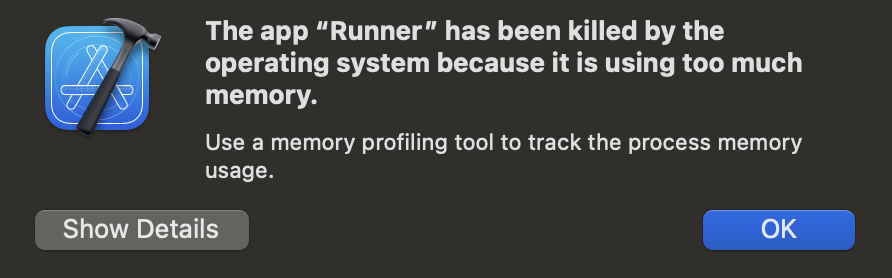
따라서 추후 모델 경량화에 관심이 생기면 모델의 크기를 줄이고 NPU 작업도 진행해보면 좋을 것 같다.
앱은 `Flutter`를 이용하여 간단한 test 형태로 작업하였다. 이를 위해 환경 설정과 실행 코드는 다음과 같다.
# pubspec.yaml
dependencies:
  flutter:
    sdk: flutter

  cupertino_icons: ^1.0.8
  file_picker: ^10.3.10
  path_provider: ^2.1.5
  onnxruntime: ^1.4.1
  permission_handler: ^12.0.1
  ffmpeg_kit_flutter:
    git:
      url: https://github.com/Sahad2701/ffmpeg-kit.git
      path: flutter/flutter
      ref: flutter_fix_retired_v6.0.3
  audioplayers: ^6.6.0

  flutter:
    assets:
    - assets/
onnx와 mp3 파일은 assets에 들어있다.
// main.dart
import 'dart:io';
import 'dart:developer' as developer;
import 'package:flutter/material.dart';
import 'package:flutter/services.dart';
import 'package:path_provider/path_provider.dart';
import 'package:audioplayers/audioplayers.dart';
import 'demucs_processor.dart';

const String targetAudioFileName = 'NCS_cut.mp3';

void main() {
  runApp(const MyApp());
}

class MyApp extends StatelessWidget {
  const MyApp({super.key});

  @override
  Widget build(BuildContext context) {
    return MaterialApp(
      title: 'Demucs ONNX App',
      theme: ThemeData(
        colorScheme: ColorScheme.fromSeed(seedColor: Colors.blueAccent),
        useMaterial3: true,
      ),
      home: const DemucsHomePage(),
    );
  }
}

class DemucsHomePage extends StatefulWidget {
  const DemucsHomePage({super.key});

  @override
  State<DemucsHomePage> createState() => _DemucsHomePageState();
}

class _DemucsHomePageState extends State<DemucsHomePage> {
  String _statusMessage = 'Awaiting input...';
  bool _isProcessing = false;
  double _processProgress = 0.0;
  List<String> _outputFiles = [];

  final DemucsProcessor _processor = DemucsProcessor();
  final AudioPlayer _audioPlayer = AudioPlayer();
  String? _playingPath;
  bool _isPlaying = false;
  Duration _duration = Duration.zero;
  Duration _position = Duration.zero;

  @override
  void initState() {
    super.initState();

    // Set audio context to play even when device is on silent mode (crucial for iOS)
    AudioPlayer.global.setAudioContext(
      AudioContext(
        iOS: AudioContextIOS(category: AVAudioSessionCategory.playback),
        android: AudioContextAndroid(
          isSpeakerphoneOn: true,
          stayAwake: true,
          contentType: AndroidContentType.music,
          usageType: AndroidUsageType.media,
          audioFocus: AndroidAudioFocus.gain,
        ),
      ),
    );

    _audioPlayer.onPlayerStateChanged.listen((state) {
      if (mounted) {
        setState(() {
          _isPlaying = state == PlayerState.playing;
        });
      }
    });
    _audioPlayer.onPlayerComplete.listen((_) {
      if (mounted) {
        setState(() {
          _isPlaying = false;
          _playingPath = null;
          _position = Duration.zero;
        });
      }
    });
    _audioPlayer.onDurationChanged.listen((d) {
      if (mounted) {
        setState(() {
          _duration = d;
        });
      }
    });
    _audioPlayer.onPositionChanged.listen((p) {
      if (mounted) {
        setState(() {
          _position = p;
        });
      }
    });

    _loadExistingOutputs();
  }

  Future<void> _loadExistingOutputs() async {
    final tempDir = await getTemporaryDirectory();
    final sources = ['vocals', 'drums', 'bass', 'other'];
    List<String> existingFiles = [];

    for (String source in sources) {
      final file = File('${tempDir.path}/${source}_out.wav');
      if (await file.exists()) {
        existingFiles.add(file.path);
      }
    }

    if (existingFiles.isNotEmpty && mounted) {
      setState(() {
        _outputFiles = existingFiles;
        _statusMessage = 'Found existing processed files ready to play.';
      });
    }
  }

  @override
  void dispose() {
    _processor.release();
    _audioPlayer.dispose();
    super.dispose();
  }

  Future<String> _extractAsset(String assetPath, String filename) async {
    developer.log('Loading asset $assetPath...', name: 'DemucsApp');
    final byteData = await rootBundle.load(assetPath);
    final buffer = byteData.buffer;
    final tempDir = await getTemporaryDirectory();
    final file = File('${tempDir.path}/$filename');

    // Ensure the file is fully flushed to disk before ONNX C API tries to read it
    await file.writeAsBytes(
      buffer.asUint8List(byteData.offsetInBytes, byteData.lengthInBytes),
      flush: true,
    );

    final fileSize = await file.length();
    print('Extracted $assetPath to ${file.path} (Size: $fileSize bytes)');
    return file.path;
  }

  Future<void> _processAudio() async {
    setState(() {
      _isProcessing = true;
      _processProgress = 0.0;
      _statusMessage = 'Extracting assets from bundle...';
    });
    print('=== Started Process Audio ===');

    try {
      // 1. Extract Asset to Temp Directory so native/FFmpeg can access it
      final modelFile = await _extractAsset(
        'assets/htdemucs.onnx',
        'htdemucs.onnx',
      );
      final audioFile = await _extractAsset(
        'assets/$targetAudioFileName',
        targetAudioFileName,
      );
      setState(() {
        _statusMessage = 'Initializing model...';
      });

      // 2. Initialize Model
      print('Initializing model at path: $modelFile');
      await _processor.initModel(modelFile);

      setState(() {
        _statusMessage =
            'Model initialized. Processing audio (this takes time)...';
      });

      // 3. Process
      print('Starting audio processing for file: $audioFile');
      final outputs = await _processor.processAudio(audioFile, (
        progress,
        percentage,
      ) {
        print('Progress: $progress');
        setState(() {
          _statusMessage = progress;
          _processProgress = percentage;
        });
      });

      print('Processing Complete. Output files: $outputs');
      setState(() {
        _isProcessing = false;
        _processProgress = 1.0;
        _outputFiles = outputs;
        _statusMessage =
            'Processing complete!\nFiles saved at:\n${outputs.join('\n')}';
      });
    } catch (e, stackTrace) {
      print('An error occurred during processing: $e\n$stackTrace');
      setState(() {
        _isProcessing = false;
        _statusMessage = 'Error processing:\n\n$e\n\nStacktrace:\n$stackTrace';
      });
    }
  }

  @override
  Widget build(BuildContext context) {
    return Scaffold(
      appBar: AppBar(
        title: const Text('Demucs ONNX Audio Separator'),
        backgroundColor: Theme.of(context).colorScheme.inversePrimary,
      ),
      body: Padding(
        padding: const EdgeInsets.all(24.0),
        child: Column(
          crossAxisAlignment: CrossAxisAlignment.stretch,
          children: [
            const Card(
              child: Padding(
                padding: EdgeInsets.all(20.0),
                child: Text(
                  'The Demucs model and Audio file are loaded directly from the App Assets.\n\n'
                  '- Model: assets/htdemucs.onnx\n'
                  '- Audio: assets/$targetAudioFileName',
                  style: TextStyle(fontSize: 15),
                ),
              ),
            ),
            const SizedBox(height: 48),
            ElevatedButton.icon(
              icon: const Icon(Icons.play_arrow),
              label: Text(
                _isProcessing
                    ? 'Processing... (This takes time)'
                    : 'Separate Stems',
              ),
              onPressed: _isProcessing ? null : _processAudio,
              style: ElevatedButton.styleFrom(
                padding: const EdgeInsets.all(20),
                backgroundColor: Colors.blueAccent,
                foregroundColor: Colors.white,
              ),
            ),

            if (_isProcessing) ...[
              const SizedBox(height: 16),
              LinearProgressIndicator(
                value: _processProgress,
                backgroundColor: Colors.grey.shade300,
                color: Colors.blueAccent,
                minHeight: 12,
                borderRadius: BorderRadius.circular(6),
              ),
              const SizedBox(height: 8),
              Text(
                '${(_processProgress * 100).toStringAsFixed(1)}%',
                textAlign: TextAlign.right,
                style: const TextStyle(fontWeight: FontWeight.bold),
              ),
            ],

            const SizedBox(height: 24),
            if (_outputFiles.isNotEmpty) ...[
              const Text(
                'Outputs:',
                style: TextStyle(fontWeight: FontWeight.bold, fontSize: 16),
              ),
              const SizedBox(height: 8),
              Expanded(
                flex: 2,
                child: ListView.builder(
                  itemCount: _outputFiles.length,
                  itemBuilder: (context, index) {
                    final path = _outputFiles[index];
                    final fileName = path.split('/').last;
                    final isPlayingThis = _playingPath == path && _isPlaying;

                    return Card(
                      child: Column(
                        mainAxisSize: MainAxisSize.min,
                        children: [
                          ListTile(
                            leading: const Icon(Icons.music_note),
                            title: Text(fileName),
                            trailing: IconButton(
                              icon: Icon(
                                isPlayingThis ? Icons.stop : Icons.play_arrow,
                              ),
                              onPressed: () async {
                                if (isPlayingThis) {
                                  await _audioPlayer.stop();
                                  setState(() => _playingPath = null);
                                } else {
                                  await _audioPlayer.stop();
                                  setState(() {
                                    _playingPath = path;
                                    _position = Duration.zero;
                                  });
                                  await _audioPlayer.play(
                                    DeviceFileSource(path),
                                  );
                                }
                              },
                            ),
                          ),
                          if (_playingPath == path)
                            Padding(
                              padding: const EdgeInsets.symmetric(
                                horizontal: 16.0,
                              ),
                              child: Row(
                                children: [
                                  Text(
                                    '${_position.inMinutes}:${(_position.inSeconds % 60).toString().padLeft(2, '0')}',
                                    style: const TextStyle(fontSize: 12),
                                  ),
                                  Expanded(
                                    child: Slider(
                                      value: _position.inMilliseconds
                                          .toDouble(),
                                      min: 0.0,
                                      max:
                                          _duration.inMilliseconds.toDouble() >
                                              0
                                          ? _duration.inMilliseconds.toDouble()
                                          : 1.0,
                                      onChanged: (value) async {
                                        await _audioPlayer.seek(
                                          Duration(milliseconds: value.toInt()),
                                        );
                                      },
                                    ),
                                  ),
                                  Text(
                                    '${_duration.inMinutes}:${(_duration.inSeconds % 60).toString().padLeft(2, '0')}',
                                    style: const TextStyle(fontSize: 12),
                                  ),
                                ],
                              ),
                            ),
                          const SizedBox(height: 8),
                        ],
                      ),
                    );
                  },
                ),
              ),
              const SizedBox(height: 16),
            ],
            const Text(
              'Status:',
              style: TextStyle(fontWeight: FontWeight.bold, fontSize: 16),
            ),
            const SizedBox(height: 8),
            Expanded(
              flex: 1,
              child: Container(
                padding: const EdgeInsets.all(12),
                decoration: BoxDecoration(
                  color: Colors.grey.shade100,
                  borderRadius: BorderRadius.circular(8),
                  border: Border.all(color: Colors.grey.shade300),
                ),
                child: SingleChildScrollView(
                  child: Text(
                    _statusMessage,
                    style: const TextStyle(
                      fontSize: 14,
                      fontFamily: 'monospace',
                    ),
                  ),
                ),
              ),
            ),
          ],
        ),
      ),
    );
  }
}
// demucs_processor.dart
import 'dart:io';
import 'dart:typed_data';
import 'package:ffmpeg_kit_flutter/ffmpeg_kit.dart';
import 'package:ffmpeg_kit_flutter/return_code.dart';
import 'package:onnxruntime/onnxruntime.dart';
import 'package:path_provider/path_provider.dart';
class DemucsProcessor {
OrtSession? _session;
OrtSessionOptions? _sessionOptions;
OrtRunOptions? _runOptions;
Future<void> initModel(String modelPath) async {
OrtEnv.instance.init();
try {
_sessionOptions = OrtSessionOptions();
_sessionOptions!.setInterOpNumThreads(4);
if (Platform.isAndroid) {
// _sessionOptions!.appendNnapiProvider(NnapiFlags.useNone);
} else if (Platform.isIOS || Platform.isMacOS) {
// [경고] CoreML은 300MB짜리 거대 모델의 그래프를 변환하는 도중 RAM을 수 기가바이트씩
// 먹어치우며 iOS 자체에서 앱을 강제종료(OOM Kill)시켜버리므로 임시로 비활성화합니다.
// _sessionOptions!.appendCoreMLProvider(CoreMLFlags.enableOnSubgraph);
}
_session = OrtSession.fromFile(File(modelPath), _sessionOptions!);
print("Model initialized WITH CPU Multithreading / NNAPI");
} catch (e) {
print("Model initialization failed ($e). Falling back to basic CPU...");
_sessionOptions?.release(); // Release the failed options
_sessionOptions = OrtSessionOptions(); // Create new options for CPU
_session = OrtSession.fromFile(File(modelPath), _sessionOptions!);
}
_runOptions = OrtRunOptions();
}
void release() {
_runOptions?.release();
_sessionOptions?.release();
_session?.release();
OrtEnv.instance.release();
}
Future<List<String>> processAudio(
String inputMp3Path,
Function(String, double) onProgress,
) async {
if (_session == null) throw Exception("Model not initialized!");
final tempDir = await getTemporaryDirectory();
final tempWavPath = '${tempDir.path}/temp_input.raw';
onProgress("Converting MP3 to raw Float32 PCM...", 0.05);
// Convert MP3 to 44.1kHz stereo f32le RAW
final session = await FFmpegKit.execute(
'-y -i "$inputMp3Path" -ar 44100 -ac 2 -f f32le -c:a pcm_f32le "$tempWavPath"',
);
final returnCode = await session.getReturnCode();
if (!ReturnCode.isSuccess(returnCode)) {
throw Exception(
"FFmpeg conversion failed: ${await session.getLogsAsString()}",
);
}
onProgress("Reading audio data...", 0.1);
final rawBytes = await File(tempWavPath).readAsBytes();
// Read raw float32 list (Native Endianness)
final floatList = Float32List.view(rawBytes.buffer);
// Prepare ONNX input
// The model typically expects [batch_size, channels, time_steps] -> [1, 2, frames]
final frames = floatList.length ~/ 2;
onProgress("Running Demucs model... (This will take a long time)", 0.15);
// We must interleave the flat array to channels if required, but standard wave reading is interleaved.
// Demucs expects non-interleaved. Wait, FFmpeg output is interleaved (L R L R).
// We need to de-interleave it.
final channel0 = Float32List(frames);
final channel1 = Float32List(frames);
double maxInAmp = 0.0;
for (int i = 0; i < frames; i++) {
final val0 = floatList[i * 2];
final val1 = floatList[i * 2 + 1];
channel0[i] = val0;
channel1[i] = val1;
if (val0.abs() > maxInAmp) maxInAmp = val0.abs();
if (val1.abs() > maxInAmp) maxInAmp = val1.abs();
}
print('Max input amplitude before splitting: $maxInAmp');
final int chunkSize = 343980;
final int numChunks = (frames / chunkSize).ceil();
List<Float32List> ch0Out = List.generate(4, (_) => Float32List(frames));
List<Float32List> ch1Out = List.generate(4, (_) => Float32List(frames));
for (int chunkIdx = 0; chunkIdx < numChunks; chunkIdx++) {
double p = 0.15 + (chunkIdx / numChunks) * 0.75;
onProgress(
"Running Demucs model... Chunk ${chunkIdx + 1} of $numChunks (This will take a long time)",
p,
);
int start = chunkIdx * chunkSize;
int end = (start + chunkSize) > frames ? frames : (start + chunkSize);
int currentLength = end - start;
// Prepare chunk input of EXACTLY chunkSize * 2
final chunkFlatInput = Float32List(chunkSize * 2);
// Copy data to chunk
for (int i = 0; i < currentLength; i++) {
chunkFlatInput[i] = channel0[start + i];
chunkFlatInput[chunkSize + i] = channel1[start + i];
}
// Create tensor [1, 2, chunkSize]
final inputTensor = OrtValueTensor.createTensorWithDataList(
chunkFlatInput,
[1, 2, chunkSize],
);
// Yield to the event loop so the UI can update the progress bar before starting heavy lifting
await Future.delayed(const Duration(milliseconds: 10));
final inputs = {'input': inputTensor};
final outputs = (await _session!.runAsync(_runOptions!, inputs))!;
inputTensor.release();
// Output shape [1, 4, 2, chunkSize]
final outData = outputs[0]!.value as List<dynamic>;
for (int s = 0; s < 4; s++) {
final sourceListChannels = outData[0][s] as List<dynamic>;
final ch0 = sourceListChannels[0] as List<dynamic>;
final ch1 = sourceListChannels[1] as List<dynamic>;
for (int i = 0; i < currentLength; i++) {
ch0Out[s][start + i] = ch0[i] as double;
ch1Out[s][start + i] = ch1[i] as double;
}
}
for (var out in outputs) {
out?.release();
}
}
onProgress("Processing output to WAV files...", 0.95);
List<String> outputPaths = [];
final sources = ['drums', 'bass', 'other', 'vocals'];
for (var s = 0; s < 4; s++) {
final sourceName = sources[s];
final outWavPath = '${tempDir.path}/${sourceName}_out.wav';
// Interleave back
final outFloat = Float32List(frames * 2);
double maxAmp = 0.0;
for (int i = 0; i < frames; i++) {
final val0 = ch0Out[s][i];
final val1 = ch1Out[s][i];
outFloat[i * 2] = val0;
outFloat[i * 2 + 1] = val1;
if (val0.abs() > maxAmp) maxAmp = val0.abs();
if (val1.abs() > maxAmp) maxAmp = val1.abs();
}
print('Source $sourceName final max amplitude: $maxAmp');
final wavBytesOut = _float32ToWav(outFloat, 2, 44100);
await File(outWavPath).writeAsBytes(wavBytesOut);
outputPaths.add(outWavPath);
}
return outputPaths;
}
Uint8List _float32ToWav(Float32List audioData, int channels, int sampleRate) {
// 16-bit PCM = 2 bytes per sample
var byteData = ByteData(44 + audioData.length * 2);
// RIFF Chunk
byteData.setUint8(0, 0x52); // 'R'
byteData.setUint8(1, 0x49); // 'I'
byteData.setUint8(2, 0x46); // 'F'
byteData.setUint8(3, 0x46); // 'F'
byteData.setUint32(4, 36 + audioData.length * 2, Endian.little);
byteData.setUint8(8, 0x57); // 'W'
byteData.setUint8(9, 0x41); // 'A'
byteData.setUint8(10, 0x56); // 'V'
byteData.setUint8(11, 0x45); // 'E'
// Format Chunk
byteData.setUint8(12, 0x66); // 'f'
byteData.setUint8(13, 0x6D); // 'm'
byteData.setUint8(14, 0x74); // 't'
byteData.setUint8(15, 0x20); // ' '
byteData.setUint32(16, 16, Endian.little);
byteData.setUint16(20, 1, Endian.little); // Format (1 = PCM integer)
byteData.setUint16(22, channels, Endian.little);
byteData.setUint32(24, sampleRate, Endian.little);
byteData.setUint32(
28,
sampleRate * channels * 2,
Endian.little,
); // Byte rate
byteData.setUint16(32, channels * 2, Endian.little); // Block align
byteData.setUint16(34, 16, Endian.little); // Bits per sample
// Data Chunk
byteData.setUint8(36, 0x64); // 'd'
byteData.setUint8(37, 0x61); // 'a'
byteData.setUint8(38, 0x74); // 't'
byteData.setUint8(39, 0x61); // 'a'
byteData.setUint32(40, audioData.length * 2, Endian.little);
// Convert floats [-1.0, 1.0] to 16-bit integers
var offset = 44;
for (int i = 0; i < audioData.length; i++) {
var val = audioData[i];
if (val > 1.0) val = 1.0;
if (val < -1.0) val = -1.0;
int intVal = (val * 32767.0).round();
byteData.setInt16(offset, intVal, Endian.little);
offset += 2;
}
return byteData.buffer.asUint8List();
}
} |
 |
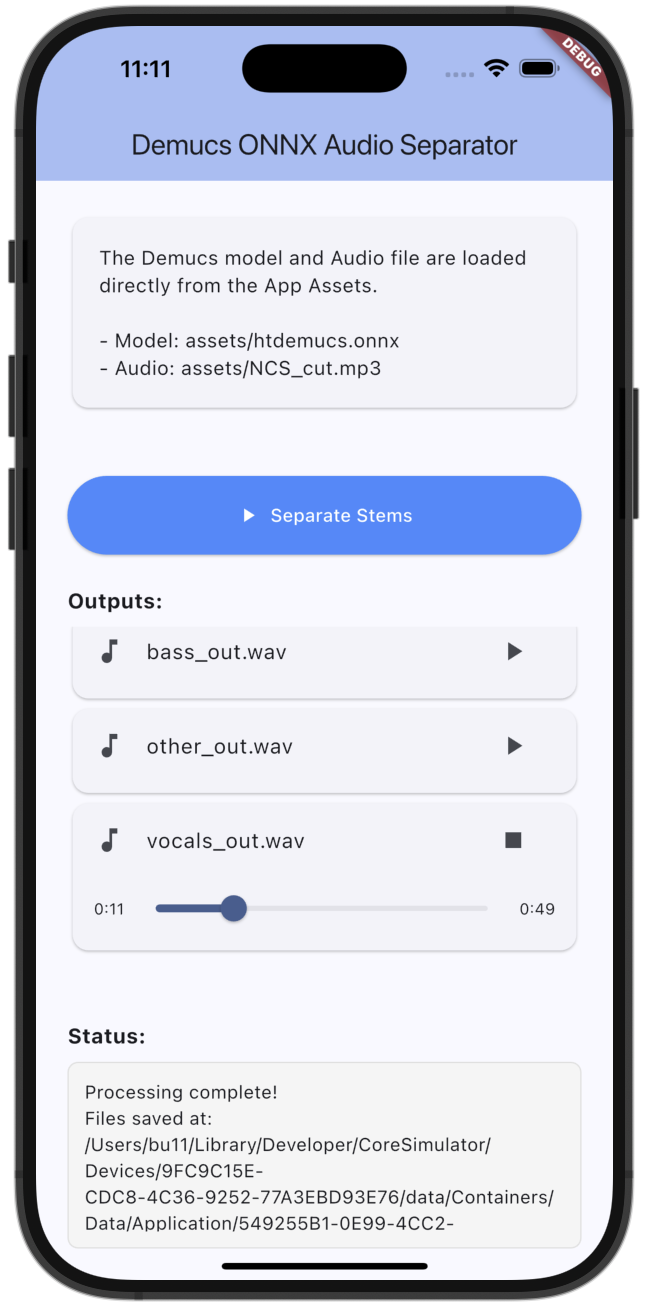 |
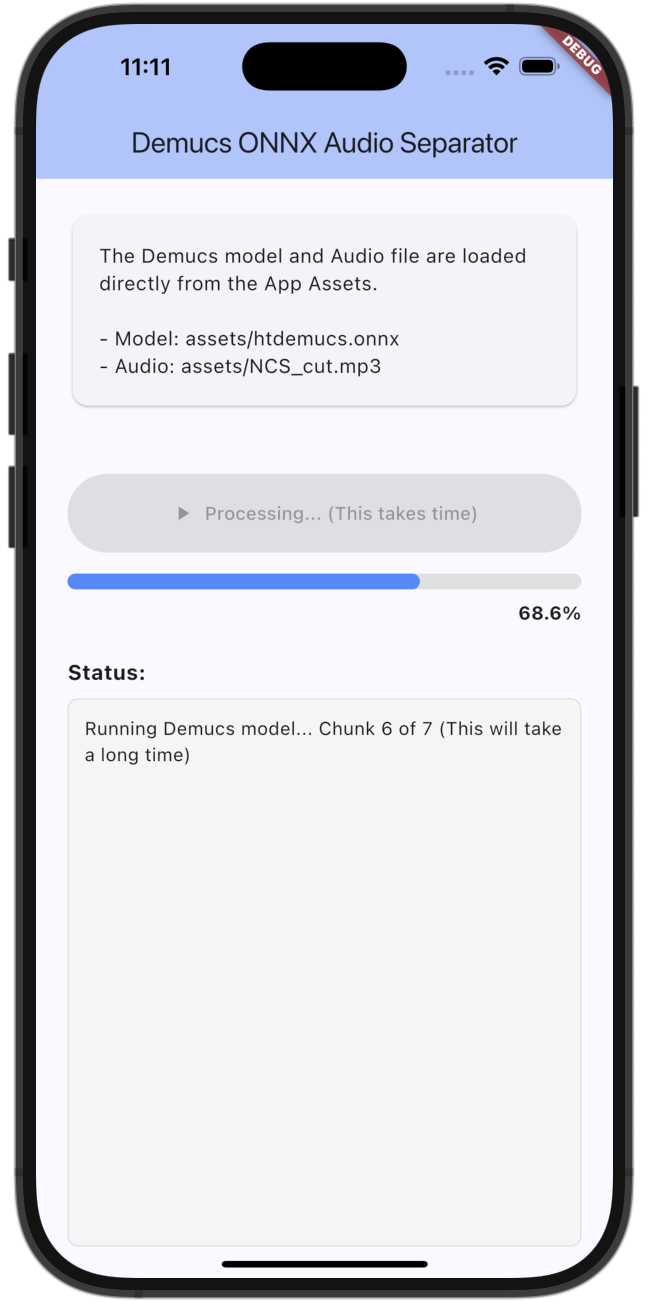
결과를 확인해보면 아이폰 내부에서도 정상적으로 처리됨을 알 수 있다. 음성의 길이는 제한적이지만 FFmpeg로 여러 배치로 쪼개서 모델에 돌리고 합치는 과정을 한다면, 시간은 오래 걸리더라도 기술적으로는 가능할 것 같다. Flutter 코드는 추후 onnx을 적극적으로 활용하게 된다면 다시 정리할 예정이다.
결론
- ONNX를 On-Device(Phone)에 로드하는 것은 가능하다.
- 모델이 300MB로 크기 때문에, 이를 경량화할 수 있도록 Quantization, Pruning 작업이 필요하다.
- NPU는 메모리 차지 및 사용량이 커서 경량화 작업 및 `CoreML`의 확장자 `.mlpackage`로 바꾼 후 적용해보는 작업도 필요해보인다.
Insights:
- 신호처리 푸리에 변환이나 Spectrogram에 대하여, 간략하게 알고 있던 사실을 깊게 탐구하는 시간을 가졌다.
- 사인파는 더 이상 쪼갤 수 없으며, 주파수 신호의 규격이라고 생각해도 된다.
- 복소수는 하나의 값이기도 하지만, 위상과 강도로 표현하는 특수한 숫자이다.
- OpenSource를 직접 수정하는 경험을 통해 타인의 코드를 구경할 수 있어서, 아키텍처 감각에 대한 내공을 다졌다.
- pytorch는 Cuda를 손쉽게 사용하게 해주는 브로커 같은 역할이라는 것 이라는 관점을 가지게 되었다.
참고 자료
- Facebook Research (Défossez et al.). (2019. 9. 3). [GitHub] Demucs: Deep Extractor for Music Sources. GitHub. https://github.com/facebookresearch/demucs
- vmv-tech. (2017. 02. 15). [DSP] STFT(Short Time Fourier Transform) - 1편. https://blog.naver.com/vmv-tech/220936084562
- Introdue AI. (2024. 05. 23). [AI] 음성인식에서 쓰이는 FFT(Fast Fourier Transform)와 STFT(Short Time Fourier Transform) 그리고 Spectrogram의 개념과 차이점. https://introduce-ai.tistory.com/entry/%EC%9D%8C%EC%84%B1%EC%9D%B8%EC%8B%9D%EC%97%90%EC%84%9C-FFT%EC%99%80-STFT%EB%9E%80
- Google. [AI] Gemini: Google의 AI 협업 도구 및 대규모 언어 모델. https://gemini.google.com/